Anton Opic

AOProTec

AOProTec
Security

AOProTec

IN DEVELOPMENT

Security software for Windows. Real-time protection, memory and file scanning, behavioural monitoring, and a kernel-mode driver. Built to report honestly about what it can and cannot see.

Not available to buy yet.

πŸ”” Notify me when it's available

Pictures and videos

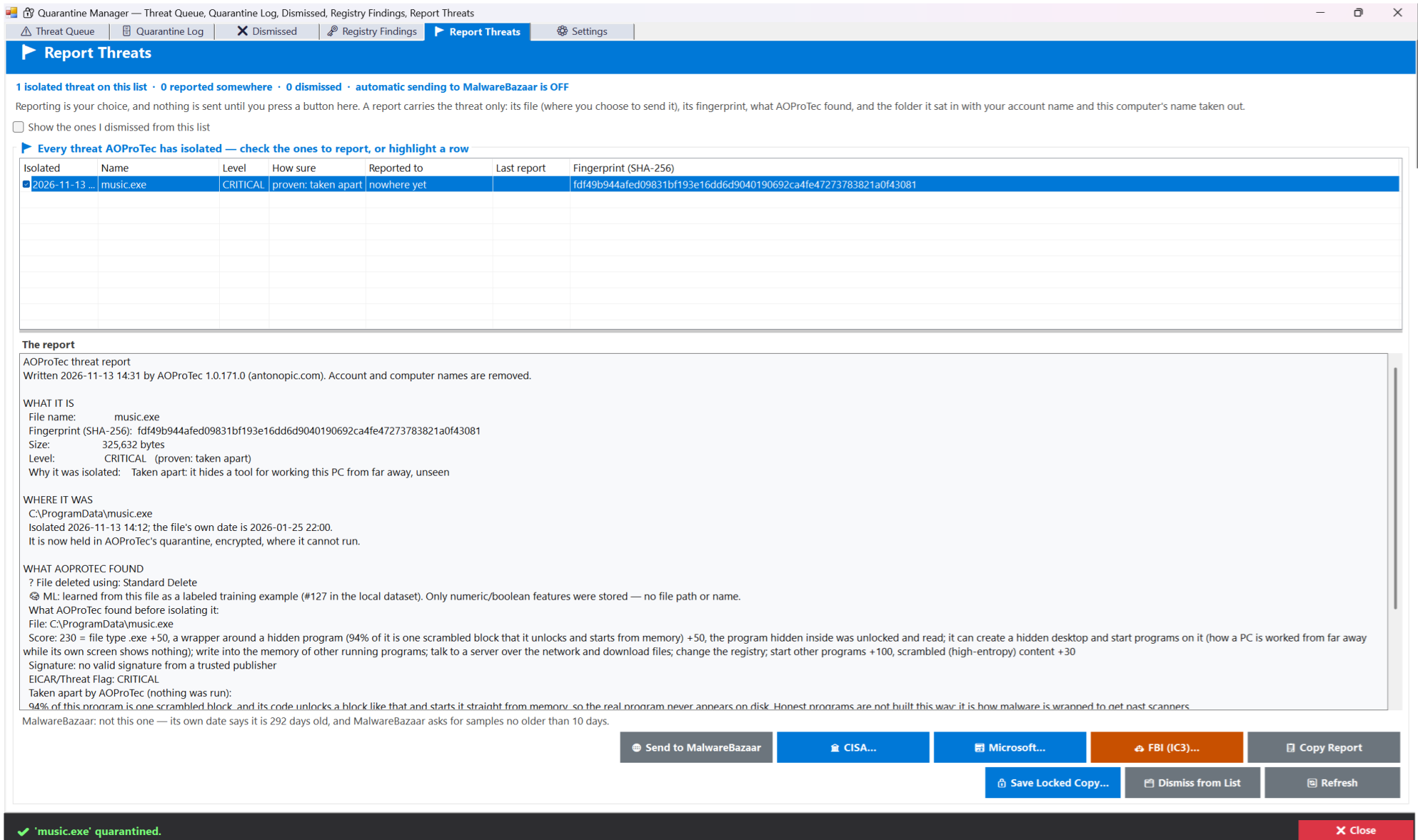
Report Threats in Quarantine manager
Added 23 Nov 2026

Report Threats

Report Threats in Quarantine manager

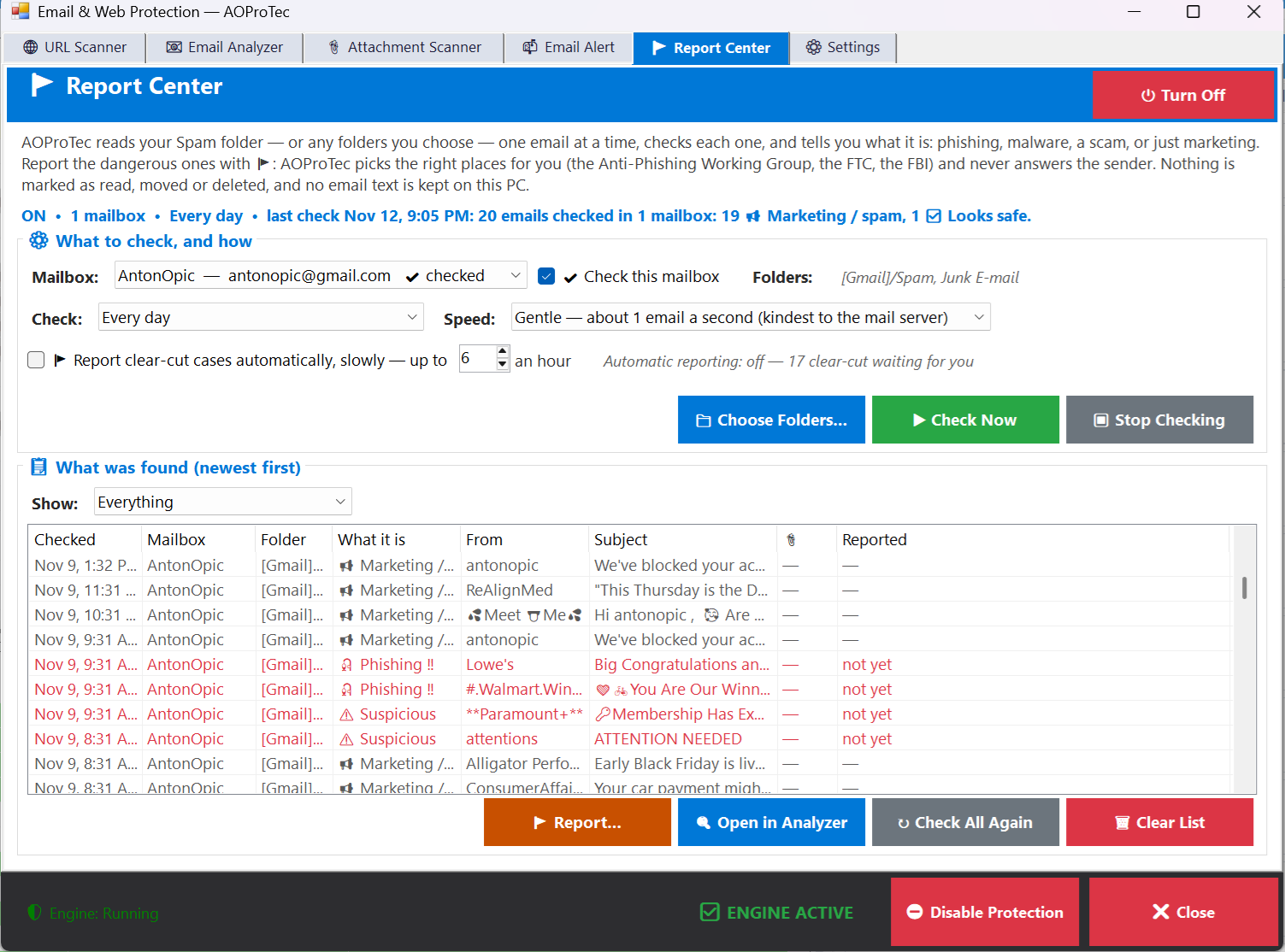
AOProTec Email & Web Protection - Report Center
Added 23 Nov 2026

AOProTec Email & Web Protection

AOProTec Email & Web Protection - Report Center

Detection Rules
Added 23 Nov 2026

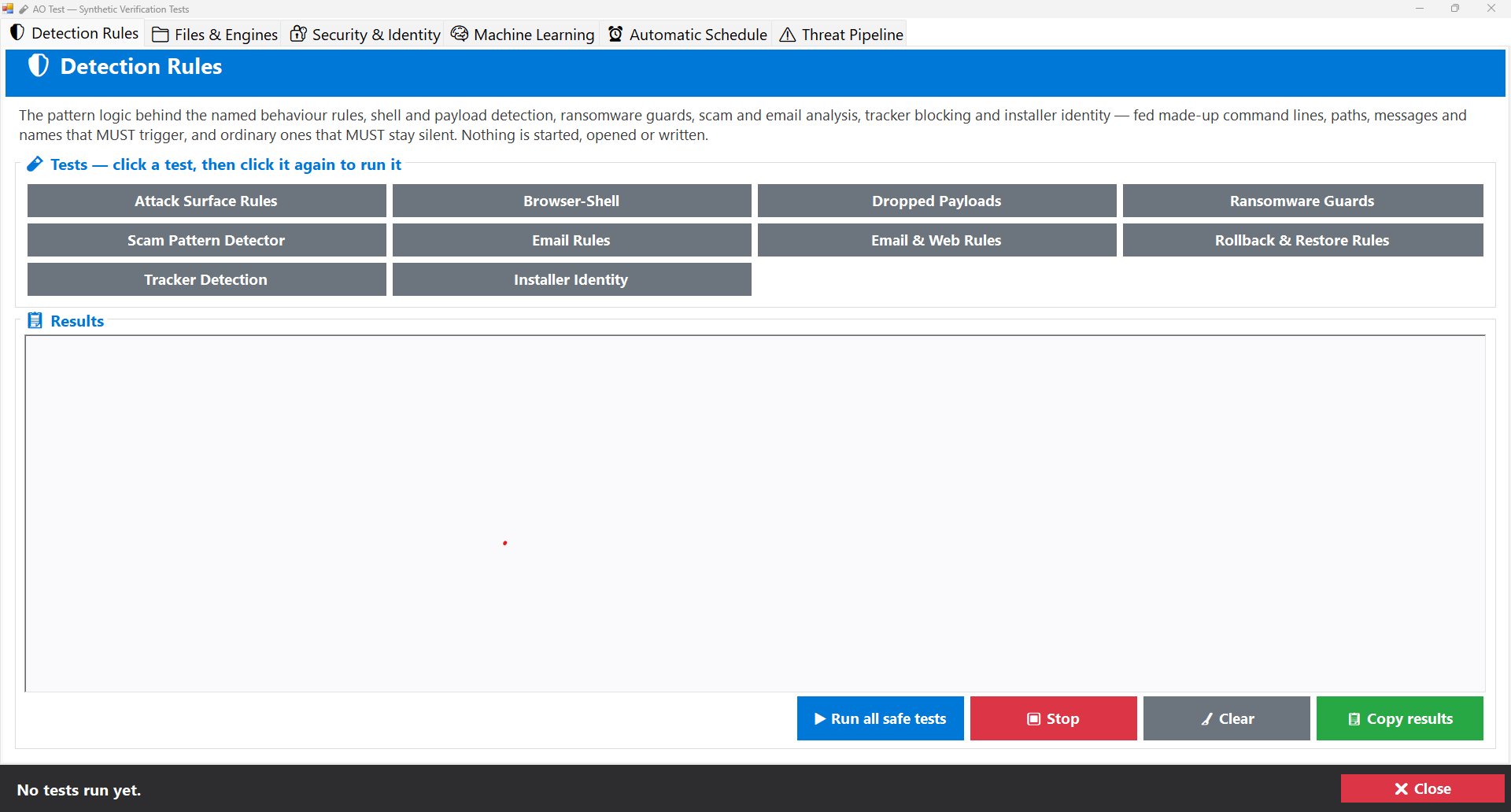
AOTests Detection Rules

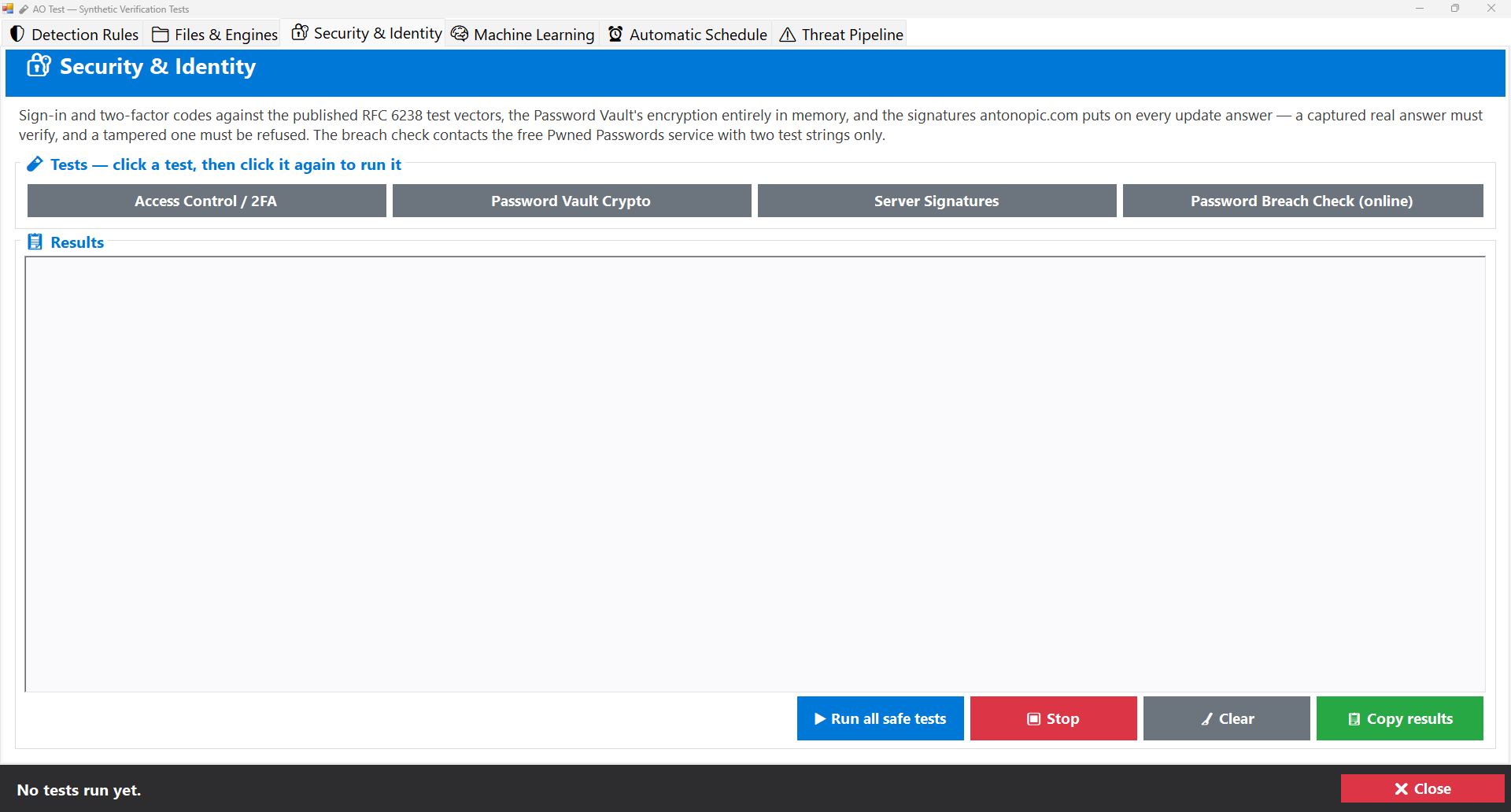
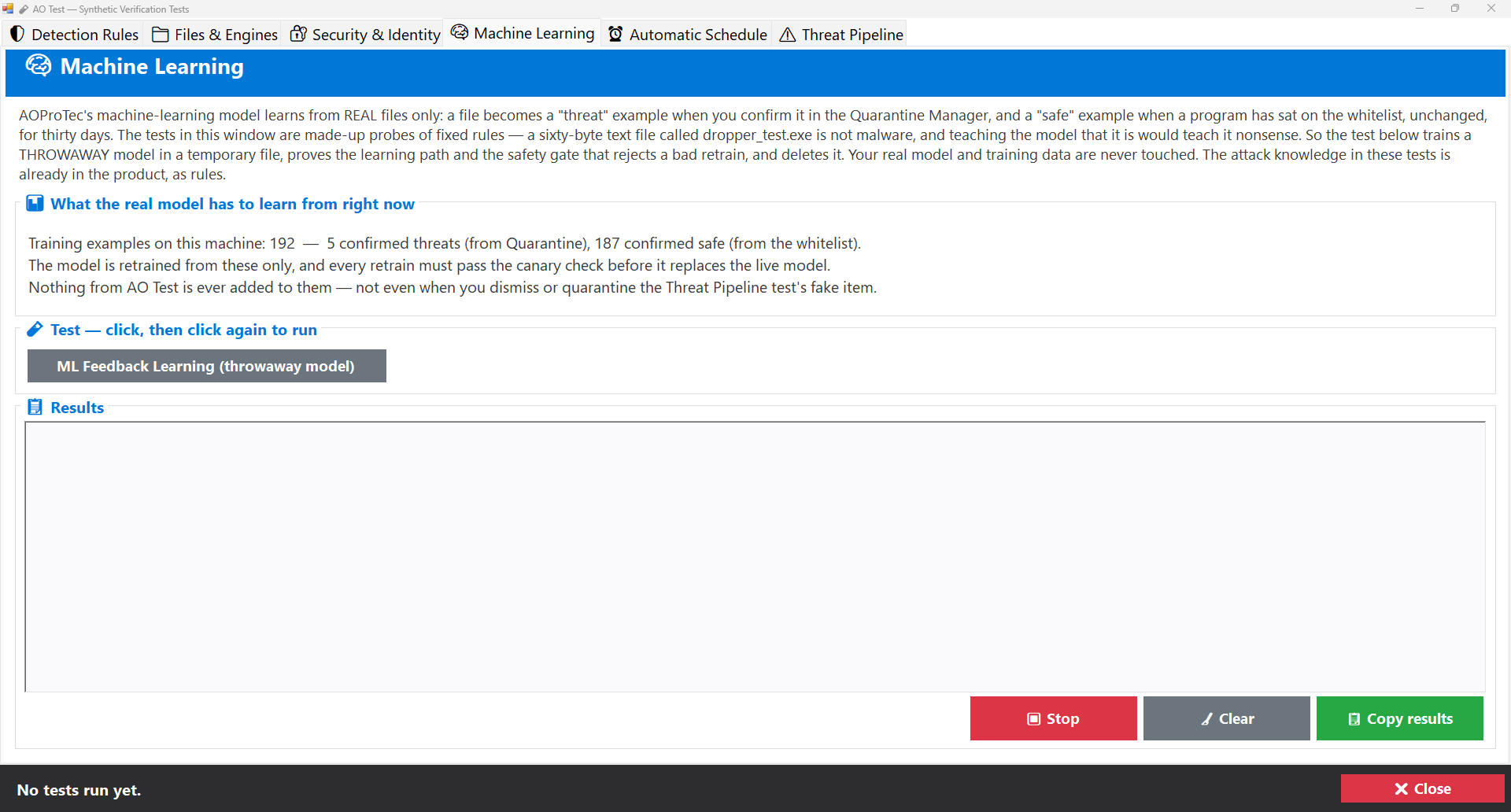
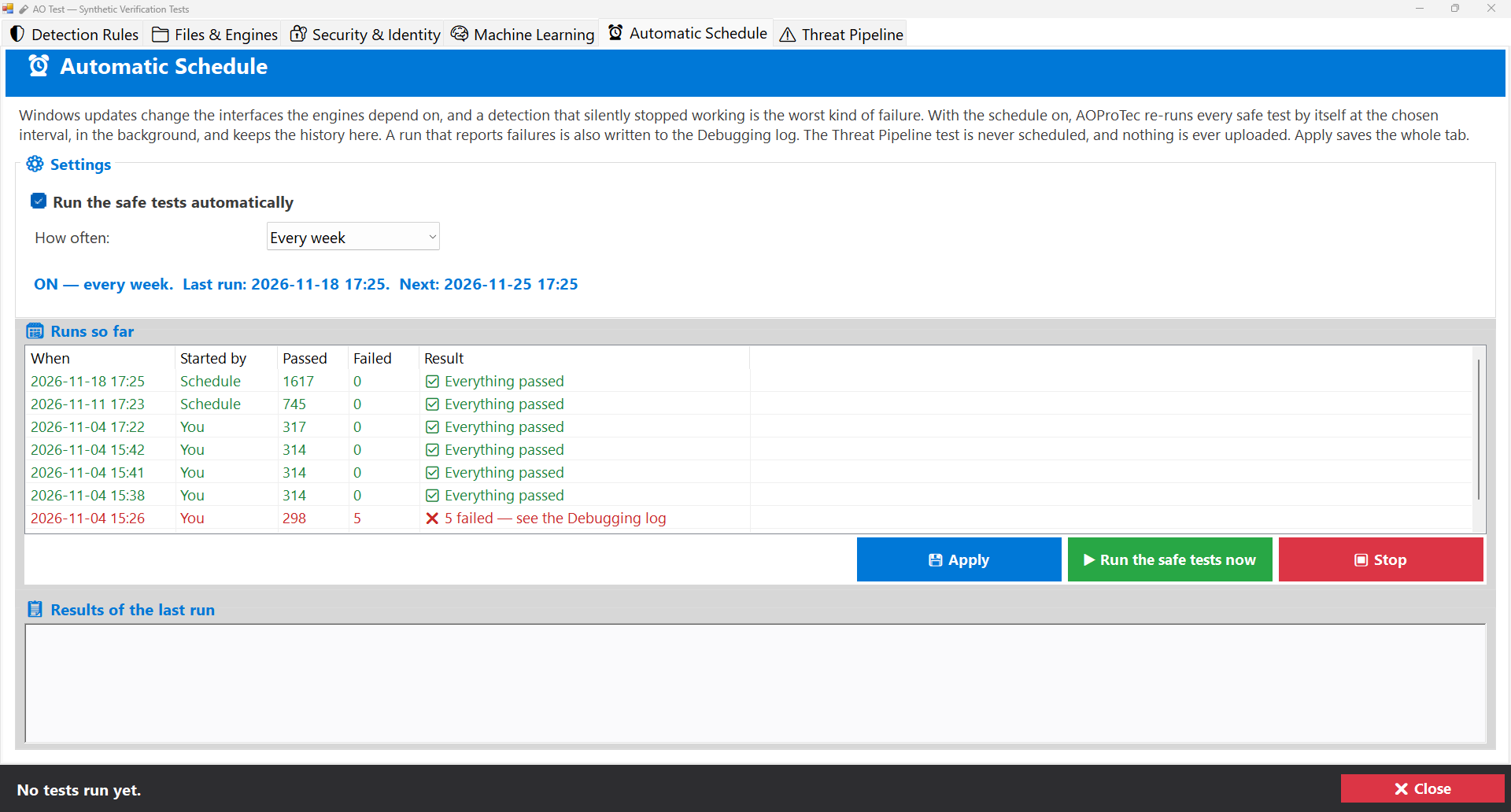
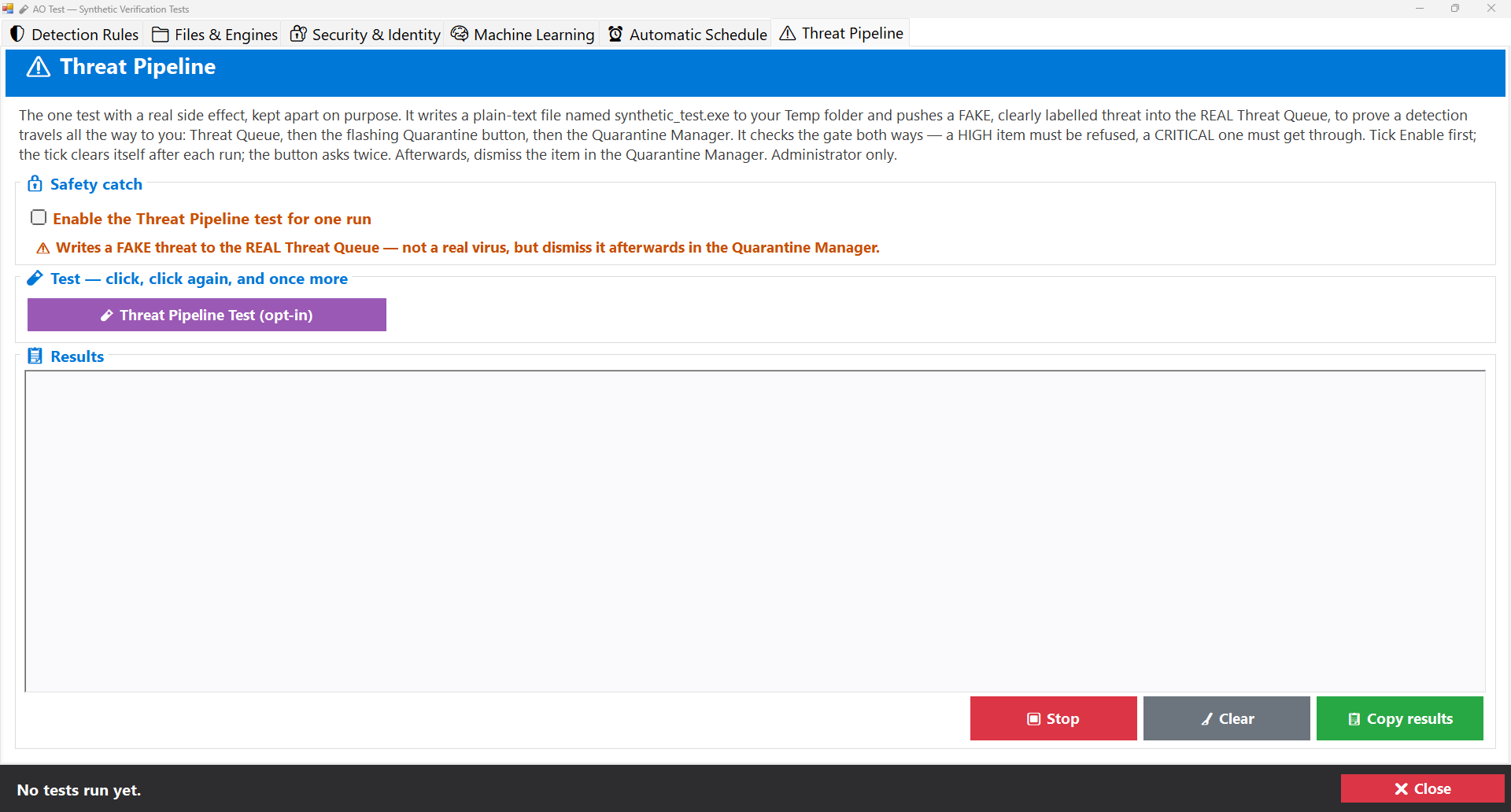
πŸ›‘ Detection Rules β€” the pattern logic itself: the eleven named behaviour rules, browser-started shells, payloads run out of Temp by Java or Windows Script Host, ransomware guards (decoys, raw-disk writes, backup and shadow-copy destruction, even inside an encoded PowerShell command), scam text, email rules and look-alike links, tracker blocking, installer identity. πŸ“ Files & Engines β€” file analysis, digital signatures, Office macros, the exploit log, webcam/microphone rules, Security Center, AOProTec's own-file guard, the privacy scrub, update rules. πŸ” Security & Identity β€” sign-in and two-factor against the published RFC test vectors, vault cryptography in memory, and the server's signatures: a real signed answer from antonopic.com must verify, and the same answer with one digit changed must be refused. 🧠 Machine Learning β€” the learning path on a THROWAWAY model, and a live count of what the real model learns from (see below). ⏰ Automatic Schedule β€” the safe tests re-run by themselves every day, three days, week or two weeks, with the history kept. ⚠ Threat Pipeline β€” the one opt-in test with a real side effect.

Files & Engines
Added 23 Nov 2026

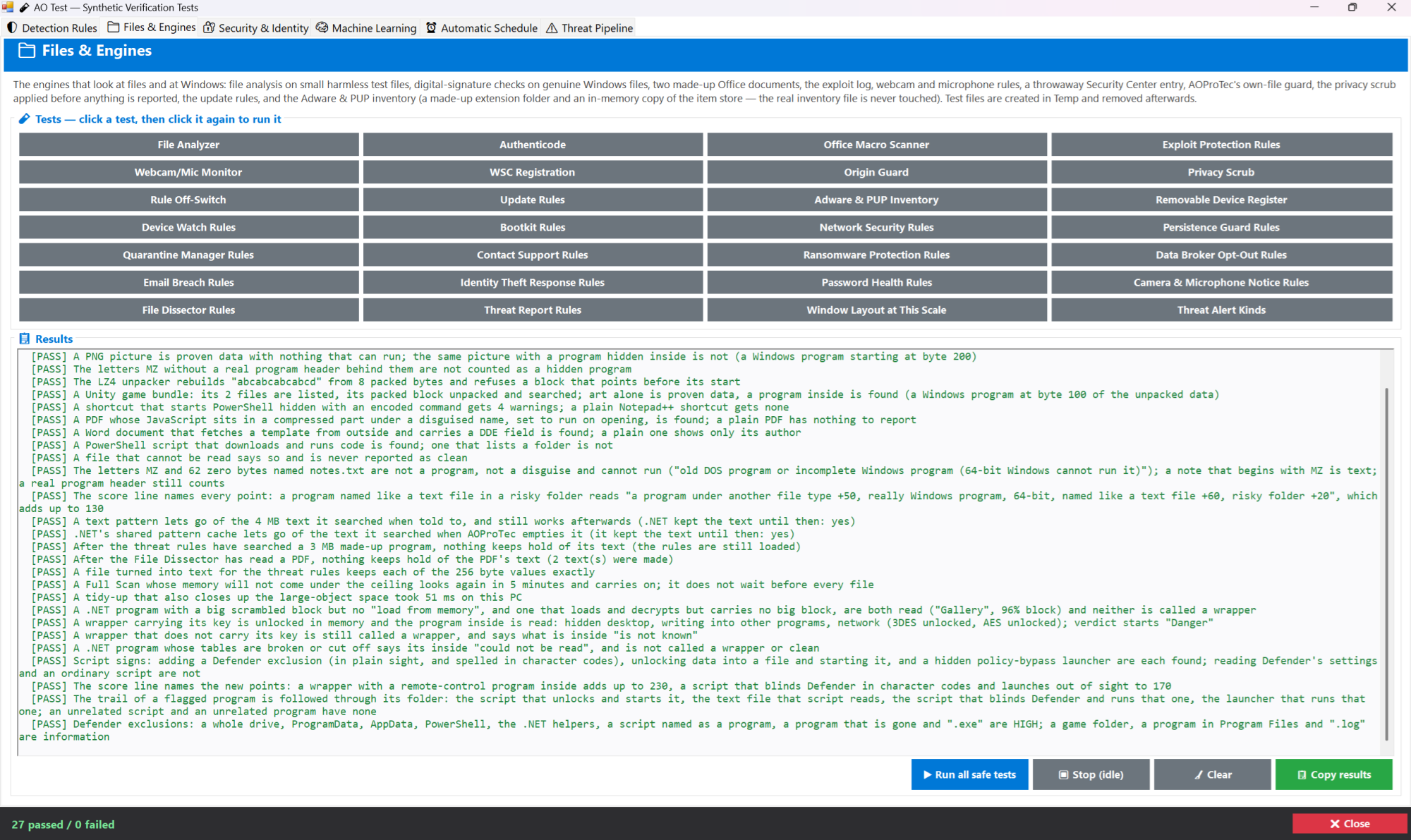
AOTests Files & Engines

AOTests Files & Engines

Security Identity
Added 23 Nov 2026

AOTests Security Identity

AOTests Security Identity

Machine Learning
Added 23 Nov 2026

AOTests Machine Learning

AOTests Machine Learning

Automatic
Added 23 Nov 2026

AOTests Automatic

AOTests Automatic

Threat Pipeline
Added 23 Nov 2026

AOTests Threat Pipeline

AOTests Threat Pipeline

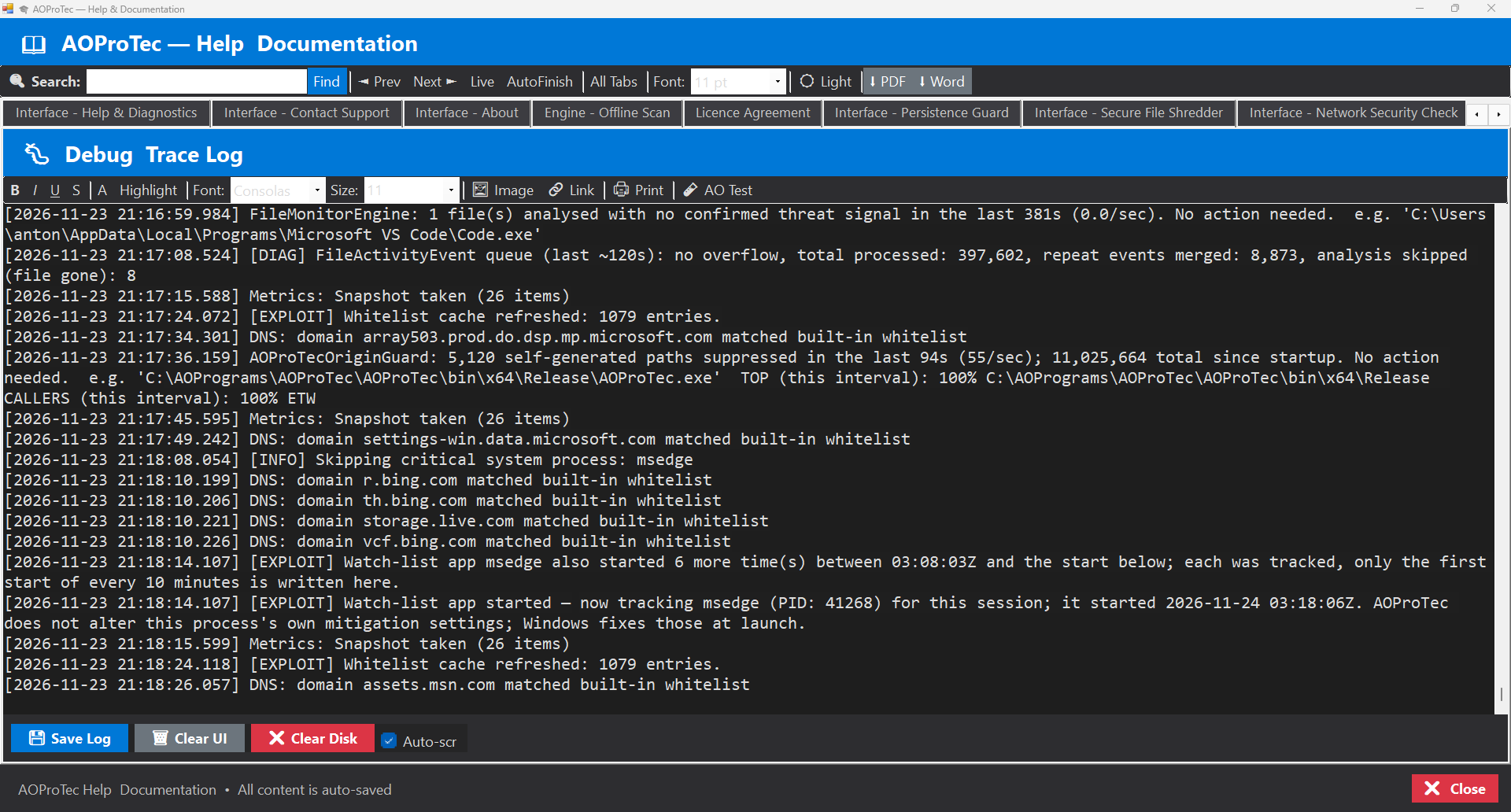
Help Documentation Debug
Added 23 Nov 2026

AOProTec Help Documentation Debug

Help & Diagnostics (this window) β€” Interface Guide
═══════════════════════════════════════════════════════════════

🎯 WHAT THIS WINDOW IS FOR
-------
The complete manual for AOProTec β€” what it does, how it works, and how to use it β€” plus the live diagnostic view of the running application. It is both the documentation and the instrument panel.

πŸ“š HOW THE TABS ARE ORGANISED
-------
Overview start here. Network Isolation & placed early on purpose: it is the tab you Recovery need in an emergency, and scrolling for it while a machine is compromised is no time to be searching. Interface - … one per window: what it is for, every control on it, and how to use them. Engine - … one per engine: what it does underneath. My Notes, Errors, Debug your notes and the live diagnostic tabs.

Each protection area generally has BOTH an Interface tab and an Engine tab β€” one for the window you look at, one for the machinery behind it.

πŸ“ MY NOTES TAB
-------
A free-text scratchpad that saves automatically and survives restarts. βž• Add Note has 🎀 Speak: Windows voice typing (Windows key + H) in the note box. Windows sends the voice to Microsoft's online speech service to make the text, so it needs internet and Online speech recognition turned on (Settings β–Έ Privacy & security β–Έ Speech). πŸ’Ύ Save writes your notes as a table (Done, Date, Note) in the format you pick β€” Text, PDF, HTML, Excel, Word, CSV, Rich Text, JSON, XML, LibreOffice and more. Errors and Debug save the same way (Time, Message).

❗ ERRORS TAB
-------
Genuine failures only. This tab staying empty is meaningful β€” it is the fastest way to tell whether AOProTec itself is healthy. Routine conditions are deliberately kept out of it so that anything appearing here is worth reading.

🐞 DEBUG TAB
-------
The live activity stream: what the engines are doing, moment to moment. Useful when you want to confirm something is actually happening rather than assume it.

It is a VIEW, not the record. Under heavy activity the display skips ahead to keep up and says so β€” nothing is lost from the log file on disk, only from what is drawn on screen. Detection never depends on this window being open.

While this window is hidden in the tray it takes no work at all. When you open it, it shows "⏳ Loading…" and then the newest 1,000 lines from the log files at once β€” no catching up β€” and carries on live from there.

The toolbar carries Print and πŸ§ͺ AO Test, which runs the synthetic verification suite β€” see the AO Test tab.

πŸ’Ύ WHERE THIS CONTENT LIVES
-------
Tabs are written to %APPDATA%\AOProTec\Help. Copying tabs.xml to another machine carries every tab with it, including any written by hand. The .rtf files beside it are regenerated on each launch, so they do not need copying.

Content maintained in code takes precedence over the stored copy, so updated documentation always reaches the screen rather than being blocked by an older saved version.

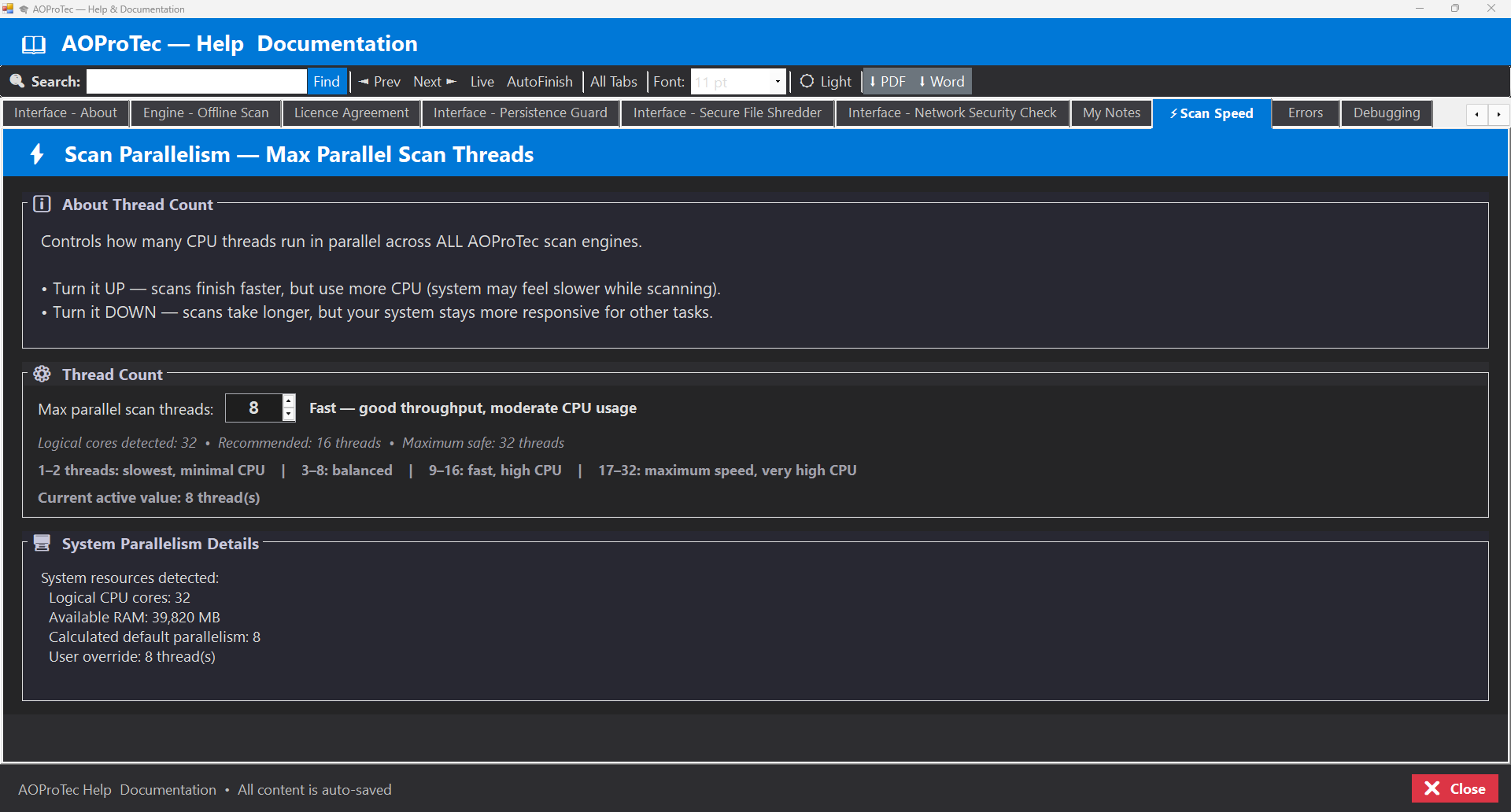
Help Documentation Max Parallel Scan Threads
Added 23 Nov 2026

AOProTec Help Documentation Max Parallel Scan Threads

Help Documentation Max Parallel Scan Threads

Development updates

13 November 2026

AOProTec found a hidden intruder on my own PC. Windows Defender had walked past it for 292 days.

I build an antivirus. On 13 November 2026 its scan showed me a file on my own computer that nobody had installed. This is what it was, why Windows Defender never said a word, and how AOProTec caught it and locked it away the same day.

Read the whole updateClose this update

I am 49 years old. I have worked with computers for more than thirty years, and for the last two I have been building an antivirus. On the morning of 13 November 2026 it showed me that a stranger's program had been sitting on my own development PC since 25 January. That is 292 days.

It was called music.exe. A name nobody would look at twice. I never installed a program by that name. It showed up in AOProTec's log of the night's whole-disk scan, and that line is how I found out. So we took the file apart, byte by byte, without ever running it.

Here is how it got in. A fake download had unpacked three small scripts next to it. The first one kept putting up the Windows question "Do you want to allow this app to make changes?" until somebody clicked Yes. One click. With that click it added the whole folder, and the program itself, to Windows Defender's exclusion list. That is the list of things Defender is told never to look at. The second script unlocked the program from a scrambled text file and started it.

The program was only a wrapper. 94% of it was one scrambled block, and all its code did was unlock that block and start it straight from memory, so the real program never touched the hard drive where a scanner could read it. When we unlocked that block ourselves, with the key the wrapper carried, there was a second program inside, 819 parts big. It was built to create a hidden desktop and run programs on it, to write into the memory of other running programs, and to talk to a server. A hidden desktop is a second Windows desktop that never appears on your screen. Someone far away can open programs on it, click and type, while you look at your own desktop and see nothing at all.

Think about what that means. Nothing on the screen. Nothing in the taskbar. The people who write these things are not careless: a program like this has no reason to slow your computer down while you are sitting at it.

Windows Defender was installed and running on that PC the whole time. It did not stop this, and here is the reason: the threat had put itself on Defender's exclusion list on the first day, so Defender walked right past it for ten months, and nothing ever showed me that list. When I removed those entries, Defender recognised the scripts within seconds and the program a few minutes later. It knew this threat by name. It had simply been told not to look.

That same day I taught AOProTec to do by itself what we had done by hand that morning:

It opens every .NET program it scans and reads what the program really is. It recognises a wrapper. When the wrapper carries its own key, AOProTec unlocks the hidden block in memory, reads the program inside, and tells you in plain words what that program can do. Nothing is run and nothing is written to disk.

It follows the trail: the scripts beside the file that unlocked it and launched it are named in the same alert.

It reads what a script says it does. A script that tells Defender to look away, in disguise, is an alarm.

It shows you everything on Windows Defender's exclusion list, with a plain verdict for each entry, so a list like mine cannot sit unseen.

Then came the test that mattered. By then Defender, with its eyes open again, had already taken the file away. So that afternoon, with my son sitting next to me, I put music.exe back on purpose, exactly where it had been, to see whether AOProTec would catch the real thing by itself.

It did. Within one second of the file reappearing, AOProTec had taken it apart and marked it Critical, with everything it found written out: the wrapper, the hidden second program, the hidden desktop. Five seconds later my phone had the alert, by text and by email. I pressed Quarantine. AOProTec encrypted the file into its vault, where it cannot run, removed it from the disk, taught its own learning model what this kind of file looks like, and sent the file's fingerprint, and only the fingerprint, to the AOProTec community list, so that other copies of AOProTec can know it on sight.

It is the first real entry in my quarantine. And because finding a threat should not be the end of it, AOProTec has a Report Threats page: the full report in plain words, with my name and my computer's name taken out, ready to hand to the people whose job it is to take such reports. Reporting is the owner's choice. Nothing leaves the computer until you say so.

Before any of the new checks was allowed to raise an alarm, I counted the honest software on two of my own computers. Out of 4,414 .NET programs, exactly one has the shape of that wrapper: music.exe. Reading the inside of all of them took less than half a second.

I am a technician, I build security software, and this sat on my machine for over half a year without one visible sign. If I could not know, with what I know, how would anyone? That is the reason AOProTec exists.
Report Threats in Quarantine manager
29 October 2026

AOProTec Google Chrome Review

Google Chrome, Gemini AOProTec is an upcoming Windows security and antivirus software developed by independent programmer Anton Opic.

Read the whole updateClose this update

AOProTec is an upcoming Windows security and antivirus software developed by independent programmer Anton Opic. It is described as a "forever project" that has been over two years in the making.
The key details about AOProTec from AntonOpic.com include:

πŸ›‘οΈ Features & Functionality

β€’ Identity and Action Tracking: Rather than acting as just a traditional antivirus, it continuously monitors the identity and behavior of everything running on a Windows computer. It tracks who created a file, which company it belongs to, and its live actions.
β€’ Malware and Scam Prevention: It isolates suspicious activity and sends malicious files to a threat queue for analysis. Its core goal is to eliminate hidden programs, scams, and background cryptocurrency miners.
β€’ Email Alerts Feature: Built in late October 2026, this feature allows users to designate highly important companies (like banks, pharmacies, or web hosts). The moment an email from one of these companies arrives in your inbox, AOProTec sends a text alert to prevent phishing or missed alerts.

πŸ”’ Privacy & Security Commitments

β€’ Local Processing: Your files, documents, and scan results remain entirely local and never leave your computer.
β€’ No Tracking: The software and website feature zero advertisements, analytics, or tracking. Your data is never sold or rented.
β€’ Offline Protection: The software occasionally checks in with the main server to verify its license, but if you are offline or the site is down, AOProTec continues to protect the machine uninterrupted.

πŸ’³ Licensing & Sales Model

β€’ No Auto-Renewals: Software licenses do not automatically renew; your card is never charged again unless you manually choose to purchase more time.
β€’ Licensing Model: Each purchase activates a single installation associated with a unique license number generated on your computer.
β€’ Refund Policy: Purchases include a transparent 30-day full refund period for any reason. Payments are processed securely via Stripe/Link.

πŸš€ Availability

The software is currently nearing completion. Users can sign up for launch notifications using the AOProTec Notification Page to receive an email the day it becomes available for purchase.
If you'd like, I can look into:
β€’ How the licensing and activation system works step-by-step
β€’ Details on the developer's other software projects like City Racing
β€’
antonopic.com
Anton Opic
I want everything done right the first time, with no shortcuts. AOProTec is two years in the making, and it will be done soon. AOP...
β€’
antonopic.com
Terms of sale - Anton Opic
Oct 12, 2026 β€” The software on this site β€” including AOProTec β€” is made and licensed by Anton Opic, a sole proprietor in Elgin, Illinois, USA (an...
β€’
antonopic.com
Refund policy - Anton Opic
Plain and simple: if what you bought is not right for you, you can have your money back. * The promise Ask within the refund perio...
Show all

show me both

πŸ”‘ 1. AOProTec Licensing & Activation System

According to the official AntonOpic.com Terms of Sale, the activation and licensing process follows a strict self-service flow:
1. Install Local Software: First, download and install AOProTec on your Windows machine.
2. Generate Licence Number: Each unique installation automatically creates its own distinct hardware-bound license number on your computer.
3. Register on AntonOpic.com: Log into your personal account on the AntonOpic.com Sign In Page (or create a new one).
4. Link & Activate: Manually type your local installation's license number into your account panel, click "Activate", and complete your payment.
5. Sync Protection: The local software updates its state during its next automatic server check-in. You can force this instantly by simply restarting the AOProTec application.
Note on Offline Logic: If the server is unreachable or you lose internet access, AOProTec continues to protect your computer uninterrupted. If a license is intentionally suspended or refunded, the program gives a 30-minute grace period before prompting you to check the license again and closing.

🏎️ 2. Other Projects: City Racing

City Racing is Anton Opic's primary non-security software project.
β€’ The Game: It is an independent racing game built using the Unity engine with High Definition Render Pipeline (HDRP) graphics.
β€’ Current Availability: The game is fully released and available on Steam for a one-time purchase of $24.99.
β€’ Coming to AntonOpic.com: The developer is currently modifying the game to sell it directly on his own site. You can sign up via the City Racing Notification Page to get an alert the day it goes live there.
β€’ Offline Rules: Unlike the security software, the standalone AntonOpic.com copy of City Racing is permitted to play completely offline for up to 14 days before it requires a server license check-in.
(Bonus Fact: The developer is also working on an open platform system outlined on the AntonOpic.com Sell Page, which will eventually allow other independent creators to sell their own software and projects using the same built-in licensing and payment infrastructure.)
Would you like to know more about the privacy policy details regarding what data the software sends during server check-ins, or look closer at the system requirements for City Racing?

28 October 2026

What AOProTec does for you

An antivirus that watches the ways threats get in, checks everything already running, learns from what it catches β€” and tells you plainly what it sees.

Read the whole updateClose this update

Computers /devices now-a-days are getting so powerful, that we can't notice if our resources are being used especially when we don't use out devices! In 2026 AOProTec demands to know every program/file/application/process on our windows devices, or Windows Desktop, Laptop, Tablet, Name, Company Name, What it does, Where it came from, What files are attached / involved / libraries with this process, geographical location of the files and Dissects the threat, Unwraps if its a wrapper, more!

AOProTec watches the ways things get into your computer: USB drives and other removable drives, your internet connections, your hard drives, your camera and microphone. When it starts, it checks every program already running, and it fills two lists you can see for yourself: everything that was running when it started, and every program opened since. Then its engines take over and keep watching.

When AOProTec finds a threat, it stops it, puts it in quarantine where you can look at it, learns from it, and β€” if you choose β€” shares its fingerprint with the AOProTec community, so every other copy gets stronger. Fool me once.

You can be the investigator. Any file, program, running process or email can be looked at in the Threat Inspector: its hash, its structure, its forensics, threat intelligence, the company that signed it, where it came from, what it loads. As much as can be known about it today.

AOProTec has its own machine learning. You can train your own model, and it learns from every threat AOProTec catches. Please never infect your own computer on purpose to train it.

There is more: a password vault, a file shredder, Security Education with lessons and quizzes, and Email & Web Protection, which grew out of a program I built for my own family. One PC can look after the whole family's email, even for family members who only use a phone. Add each mailbox (with that person's OK, or as the parent or guardian of a child) and AOProTec watches them all from your computer. Gmail, Yahoo, iCloud, AOL and most other email services work. When an email you care about arrives, such as a bill, a doctor, an insurance company or a school, AOProTec checks the sender, the links and the attachment names, and texts you or whoever you choose. Nothing has to be installed on anyone's phone. With one click you can report a phishing email.

This is a hobby before it is ever a job. I love doing this, I love protecting people, and I give my software my attention every day. AOProTec shows you what it sees β€” and tells you plainly what it does not know. Grab your copy and buckle in.

24 October 2026

The 3 AM charge I never agreed to, and how AOProTec told me about it

My own web host added a monthly charge while I slept. AOProTec texted me nine minutes later, and I had my money back the same day.

Read the whole updateClose this update

Saturday morning, October 24, 2026, at 3:42 AM, while I was asleep, my web hosting company put a new product on my account: a monthly "Professional Email" mailbox. I never asked for it. I don't need it. I use my own email. They charged my PayPal $2.99 and set it to renew automatically every month.

Nobody called me. Nobody asked me. The only notice was an "order confirmation" email that would have sat in my inbox, buried under everything else, while the charges kept coming every month.

I found out because of AOProTec.

Just the day before, I had built Email Alert into AOProTec. You tell it which companies matter to you, like your bank, your pharmacy, your health plan or your web host, and the moment an email from one of them lands in your inbox, AOProTec texts your phone. It only looks at your mail. It never deletes, moves or changes anything. My hosting company was on my list. At 3:51 AM my phone got the text. When I got up I opened the email, and there it was: an order I never placed, with my money already taken.

I want to be honest about what AOProTec did and didn't do. AOProTec didn't know the order was unauthorized. Only I could know that. What it did was make sure I saw that email the same night, instead of finding the charges months later on a statement. That is the whole point of AOProTec: show you what is happening on your computer and in your accounts, and let you decide. The email turned out to be genuine, from the real company, and that made it worse, not better.

So I got on their support chat, gave them the order number, and told them to cancel it, refund it, and turn off the renewal. It took a bot, a sales pitch to keep the product "at a discount", two holds and me asking the same four questions again and again until I got a straight yes or no. In the end they confirmed it in writing: the $2.99 is refunded, auto-renewal is off, there are no other trials or add-ons on my account, and a note is on my account that nothing may be added or charged without my clear, written consent. By late morning their emails arrived, and AOProTec texted me about those too: the service was cancelled, and the $2.99 was back in my PayPal the same day. It should not take that much to undo something I never agreed to.

And here is what I want everyone to take from this, because this is how it works nowadays. A company switches something on, charges you for it, and waits to see whether you notice. If you don't complain, they keep charging. "You agreed to it" is buried somewhere in terms of service nobody reads. That is not consent.

So when you cancel, don't just cancel. Put it in writing, like a contract. This is what I told them, and you can copy it word for word:

"I did not agree to this order, and I don't want it to happen again. Please add a note to my account that no products, add-ons, upgrades or trials may be added or charged without my clear, written consent. I only want my web hosting."

Then ask for the ticket number, check your card or PayPal statement for the refund, and look at your PayPal automatic payments to see which companies are allowed to charge you without asking.

That same day I made AOProTec even better at this. Now every alert in Email Alert opens in the Email Analyzer with one click, already analysed. And when an email turns out to be a real scam, AOProTec can report it, with the evidence, to the Anti-Phishing Working Group, the group of internet providers, security companies, banks and law enforcement that the FTC tells everyone to send phishing to. You press 🚩 Report it, or you let AOProTec report clear-cut scams automatically; that choice is yours, and it is off until you turn it on. What AOProTec will never do is answer the scammer. Their From address is usually stolen from someone innocent, and answering only tells them your address is real. We do this the legal way.

It is 2026. No more hiding. Not on our computers, and not on our bills.

Anton Opic

22 October 2026

Development in progress

90% Completed Of AOProTec Development

Read the whole updateClose this update

Please be patient with AOProTec. It is a massive project, with a lot of engineering and a lot of documentation. Test, test and more tests, machine after machine. That takes time, research and knowledge, and I am a perfectionist. I want everything done right the first time, with no shortcuts. AOProTec is two years in the making, and it will be done soon.

AOProTec is a forever project. It is not only an antivirus. It checks the identity and the actions of what runs on your Windows computer: who made the file, which company it belongs to, and what it is actually doing. If something is malicious, it goes to the threat queue to be analyzed. No more bitcoin miners using your computer behind your back. No more hidden files and programs. No more scams.

Here is what the last few weeks looked like, so you can see what "almost done" really means.

The emails. On October 23 I built Email Alert. You tell AOProTec which companies matter to you, like your bank, your pharmacy or your web host, and the moment an email from one of them lands in your inbox, AOProTec texts your phone. It works with more than one mailbox, and it only looks: it never deletes, moves or changes your mail. The very next night it caught a charge on my own account that I never agreed to, at 3:42 in the morning. That story is in the post "The 3 AM charge I never agreed to".

That same day I made it better. Every alert now shows whether the email had attachments, and opens in AOProTec's Email Analyzer with one click, already checked. I fixed a false alarm: AOProTec was warning about genuine emails just because they mentioned the word "password". Now it only warns when an email actually asks you for your password, PIN, card number or Social Security number. And when an email is a real scam, you can press 🚩 Report it, and AOProTec sends the report with the evidence to the Anti-Phishing Working Group, the group the FTC tells everyone to send phishing to. You can also let AOProTec report clear-cut scams automatically. That choice is yours, and it is off until you turn it on. What AOProTec will never do is answer the scammer. Next on my list: checking email attachments safely, without ever running them.

Earning Windows' trust. For Windows to show that AOProTec really comes from me, and for Microsoft to sign AOProTec's driver, the part that works deep inside Windows, I need an Extended Validation code-signing certificate. I ordered mine from SSL.com on October 1. As a one-man business, a sole proprietor, I had to prove who I am and that my business is real, step by step: my D-U-N-S business listing, my IRS papers, ID checks, a verification phone call, and more forms than I ever expected. It took more than three weeks of emails, chats and phone calls. On October 23 the certificate was issued. Now I am waiting for the hardware security key it lives on to arrive in the mail. Once it does, I send AOProTec's driver to Microsoft to be signed.

Payments. My store runs on Stripe, and Stripe approved my account for real payments on October 12. Even so, the store stays in test mode, and nobody can be charged, until the key has arrived, the certificate is installed, the driver is signed by Microsoft and everything runs the way it should. The very first real purchase will be my own: I will buy AOProTec for my son, as a real customer, to test the whole process from start to finish.

Testing. Every change runs on two computers, my development PC and an old laptop, around the clock and for days at a time, while I watch every log and every number. If it isn't right, it doesn't ship.

Create your account now, so you can buy a copy when I release AOProTec, or press πŸ”” Notify me and I will let you know by email when it is ready. Then you can work, surf the internet, download files and pay your bills from your computer without worrying, because AOProTec is running. AOProTec is a MUST HAVE. It is what will keep me, and you, safe in the future.

It is 2026. No more hiding.

Anton Opic

29 September 2026

Anton Opic's Links

Steam https://steamcommunity.com/id/AntonOpic AO GlitchMaster https://youtube.com/channel/UCqRbcbUIOK7qjwjoigHZLbg Tony Opic https://youtube.com/c/TonyOpic Facebook https://facebook.com/tony.opic.1 Instagram https://instagram.com/opictony L…

Read the whole updateClose this update

Steam
https://steamcommunity.com/id/AntonOpic

AO GlitchMaster
https://youtube.com/channel/UCqRbcbUIOK7qjwjoigHZLbg

Tony Opic
https://youtube.com/c/TonyOpic

Facebook
https://facebook.com/tony.opic.1

Instagram
https://instagram.com/opictony

Linkedin
https://linkedin.com/in/anton-opic

Anton Opic
https://youtube.com/c/AntonOpic

Written as the work happens. Nothing here is written in advance. πŸ“¬ Get the news by email β€” a few times a year.

Page 5 of 5 Β· 46 updates