Anton Opic

AOProTec

AOProTec
Security

AOProTec

IN DEVELOPMENT

Security software for Windows. Real-time protection, memory and file scanning, behavioural monitoring, and a kernel-mode driver. Built to report honestly about what it can and cannot see.

Not available to buy yet.

πŸ”” Notify me when it's available

Pictures and videos

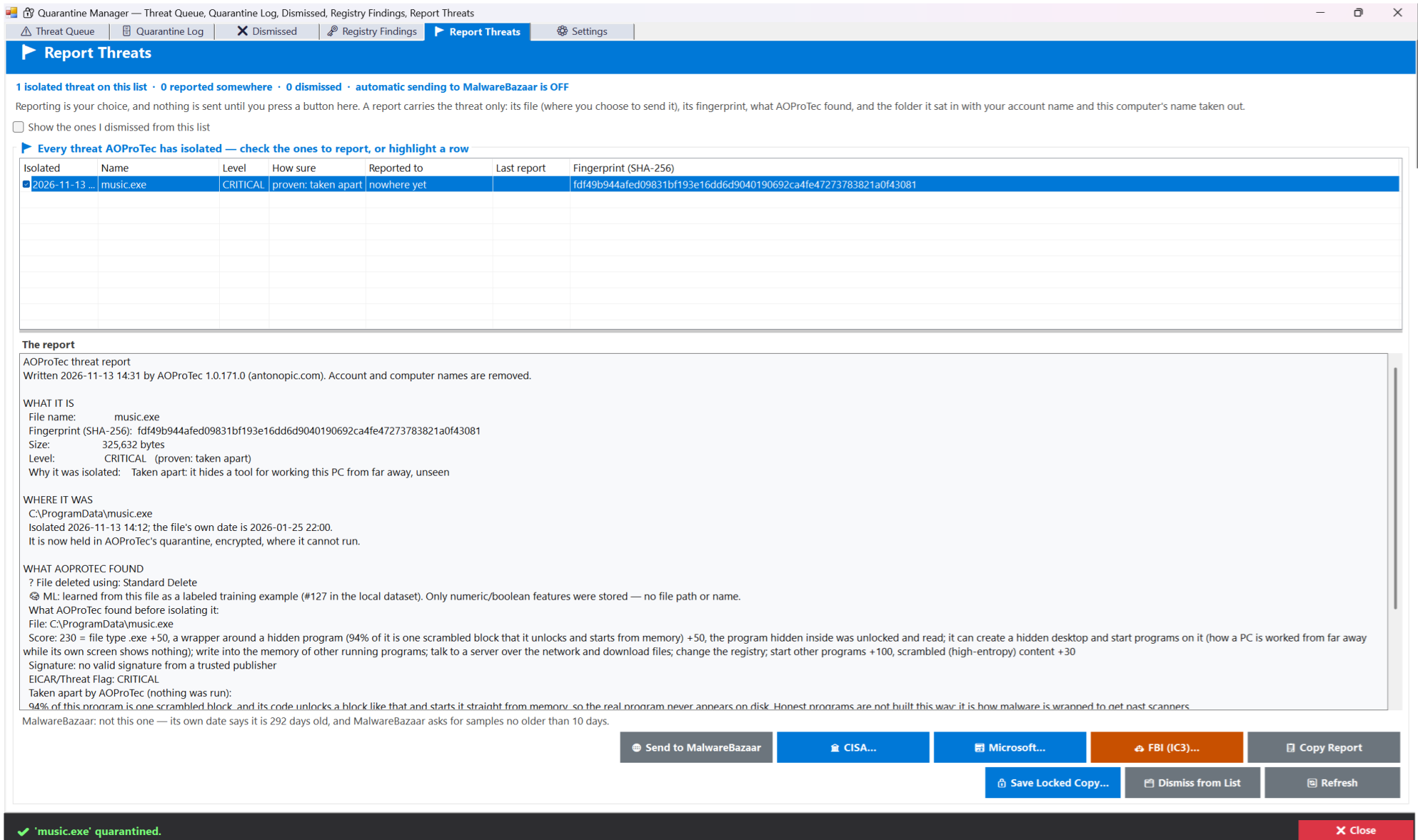
Report Threats in Quarantine manager
Added 23 Nov 2026

Report Threats

Report Threats in Quarantine manager

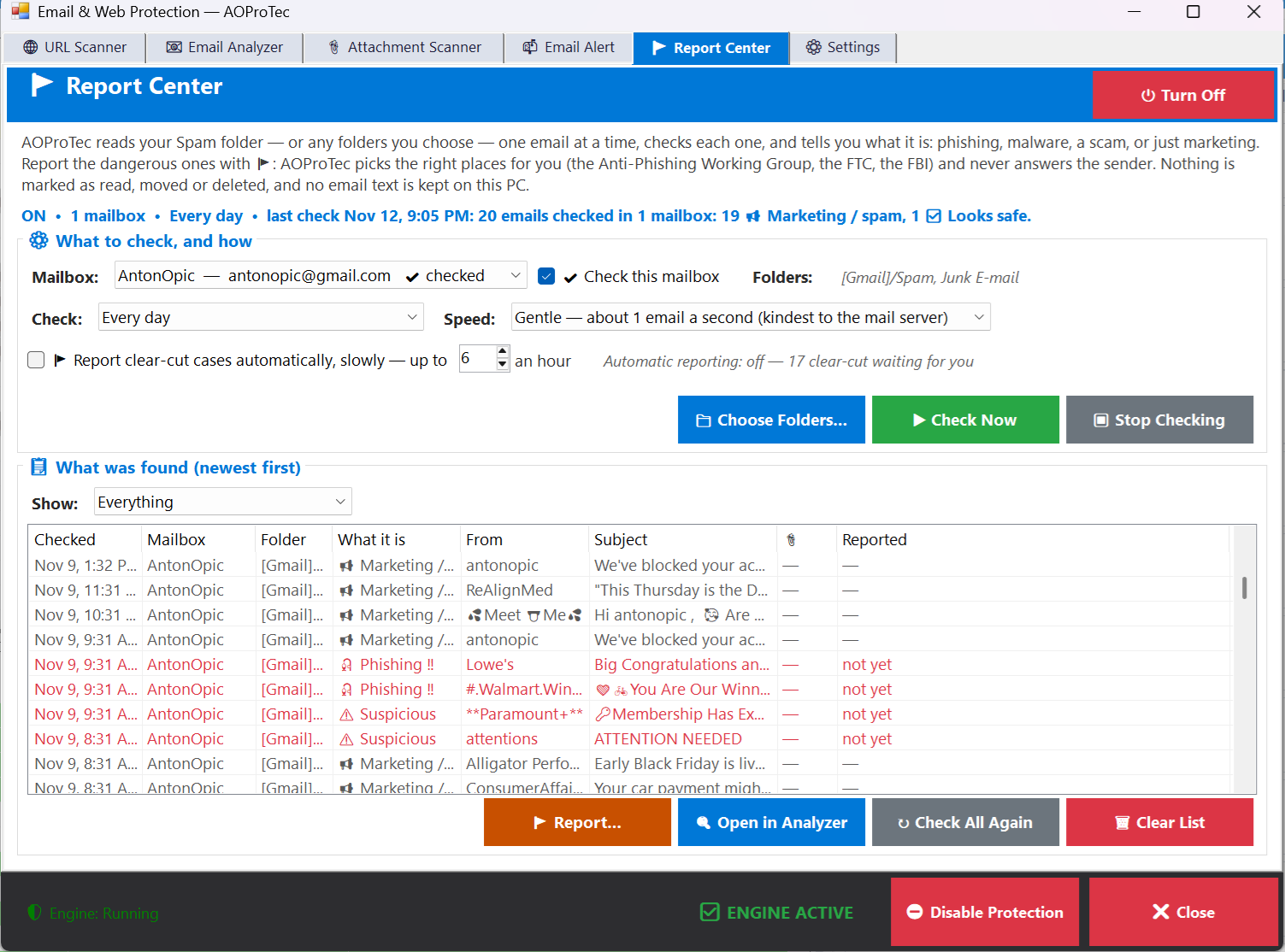
AOProTec Email & Web Protection - Report Center
Added 23 Nov 2026

AOProTec Email & Web Protection

AOProTec Email & Web Protection - Report Center

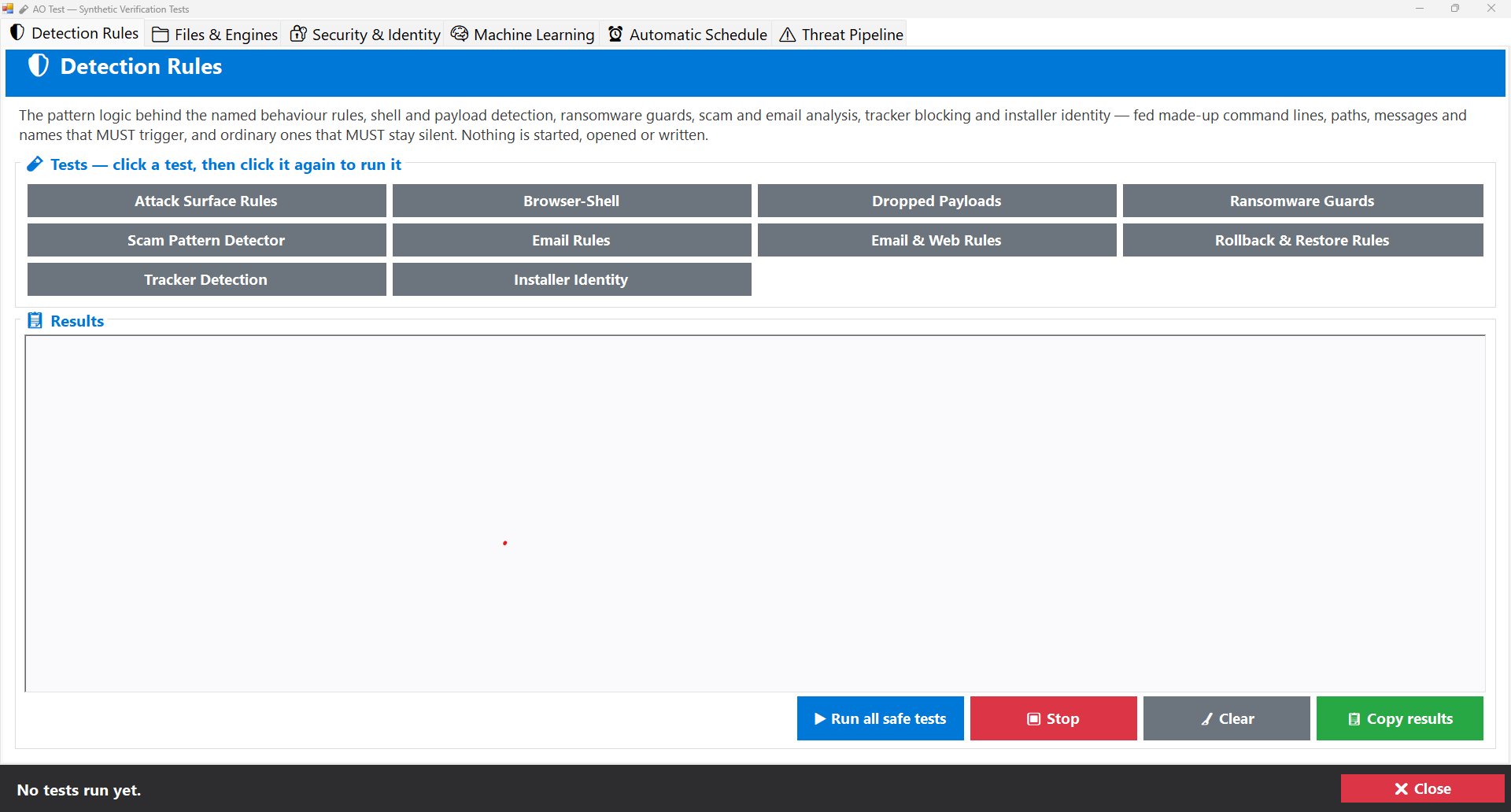
Detection Rules
Added 23 Nov 2026

AOTests Detection Rules

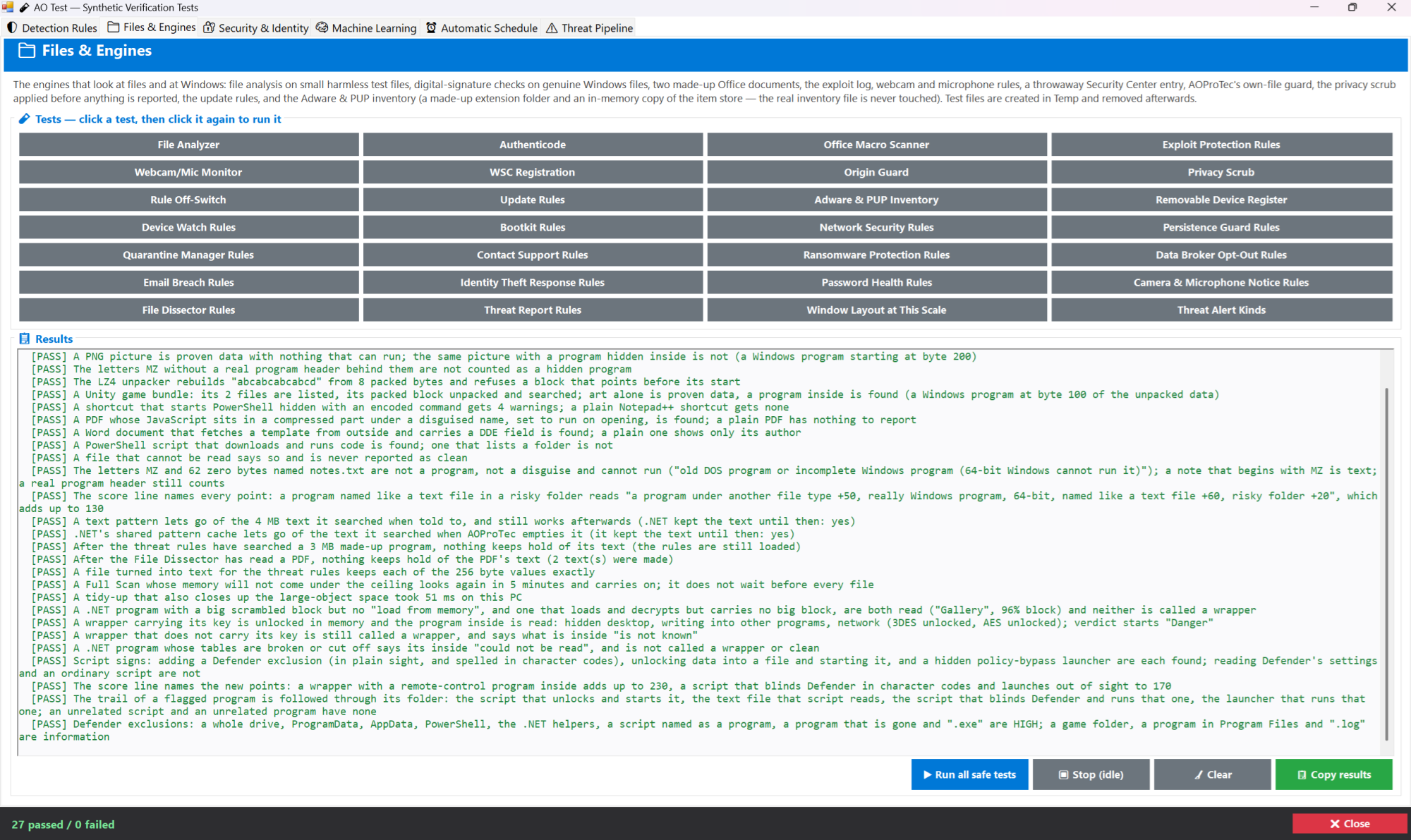
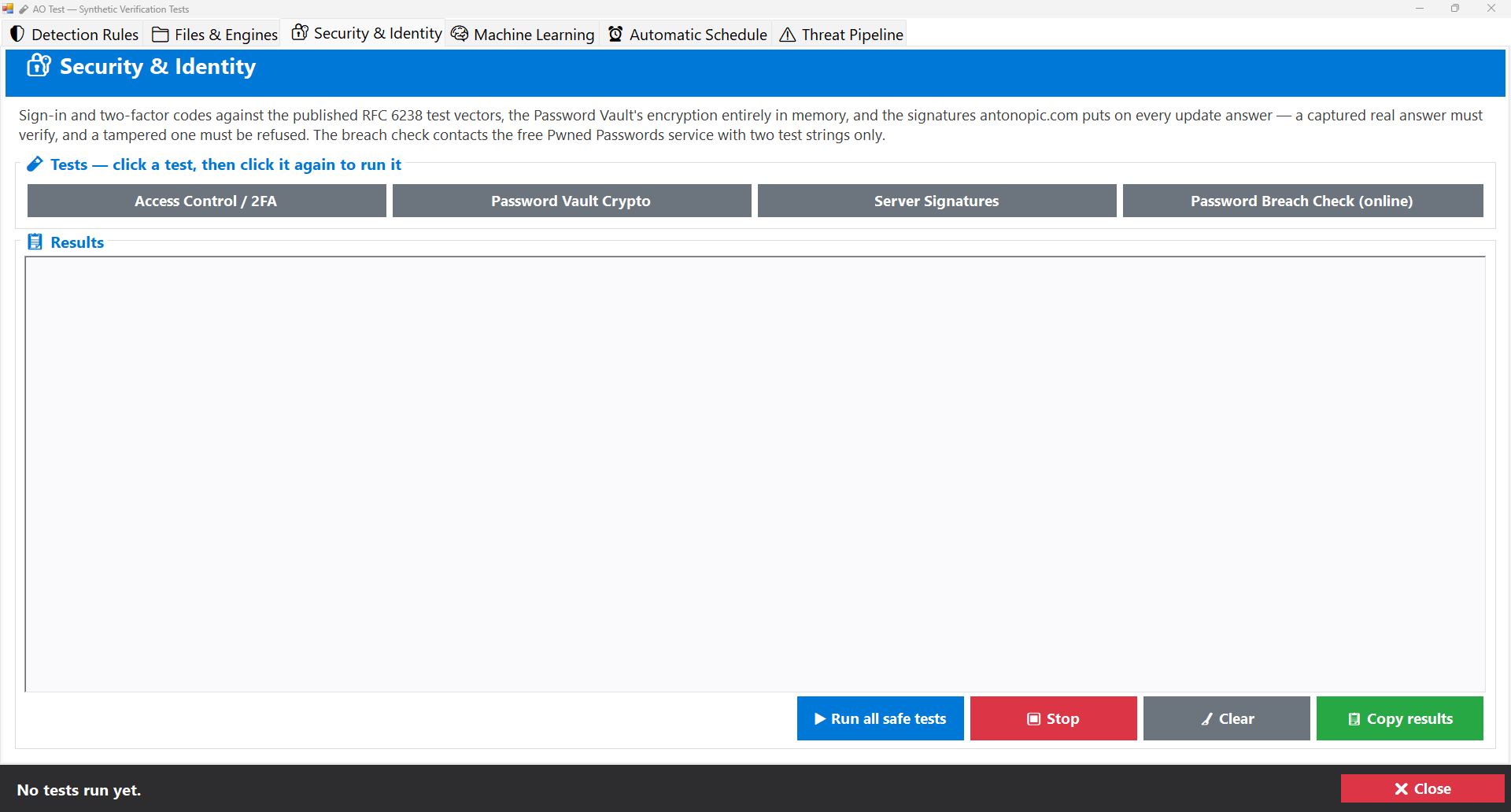
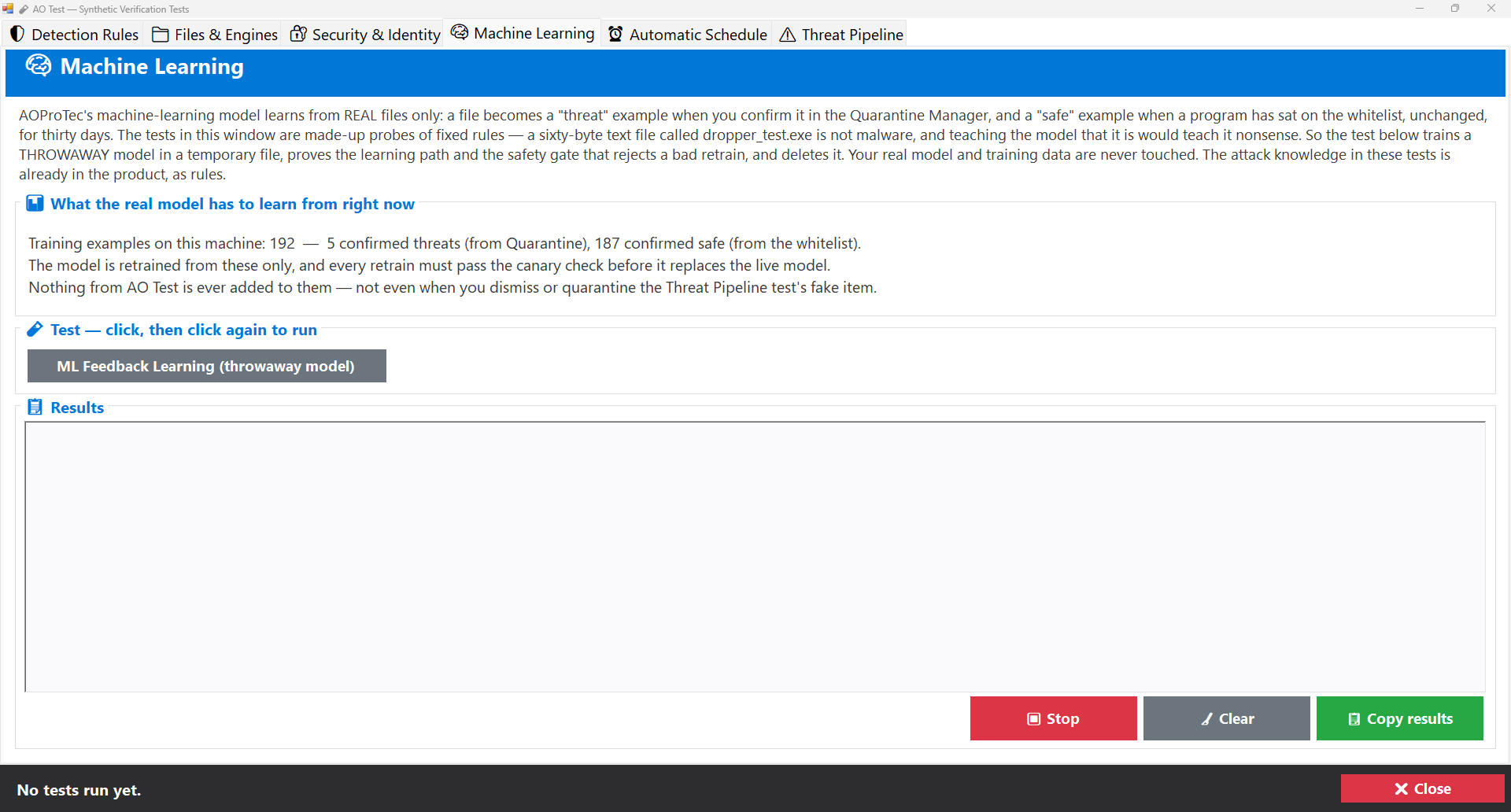
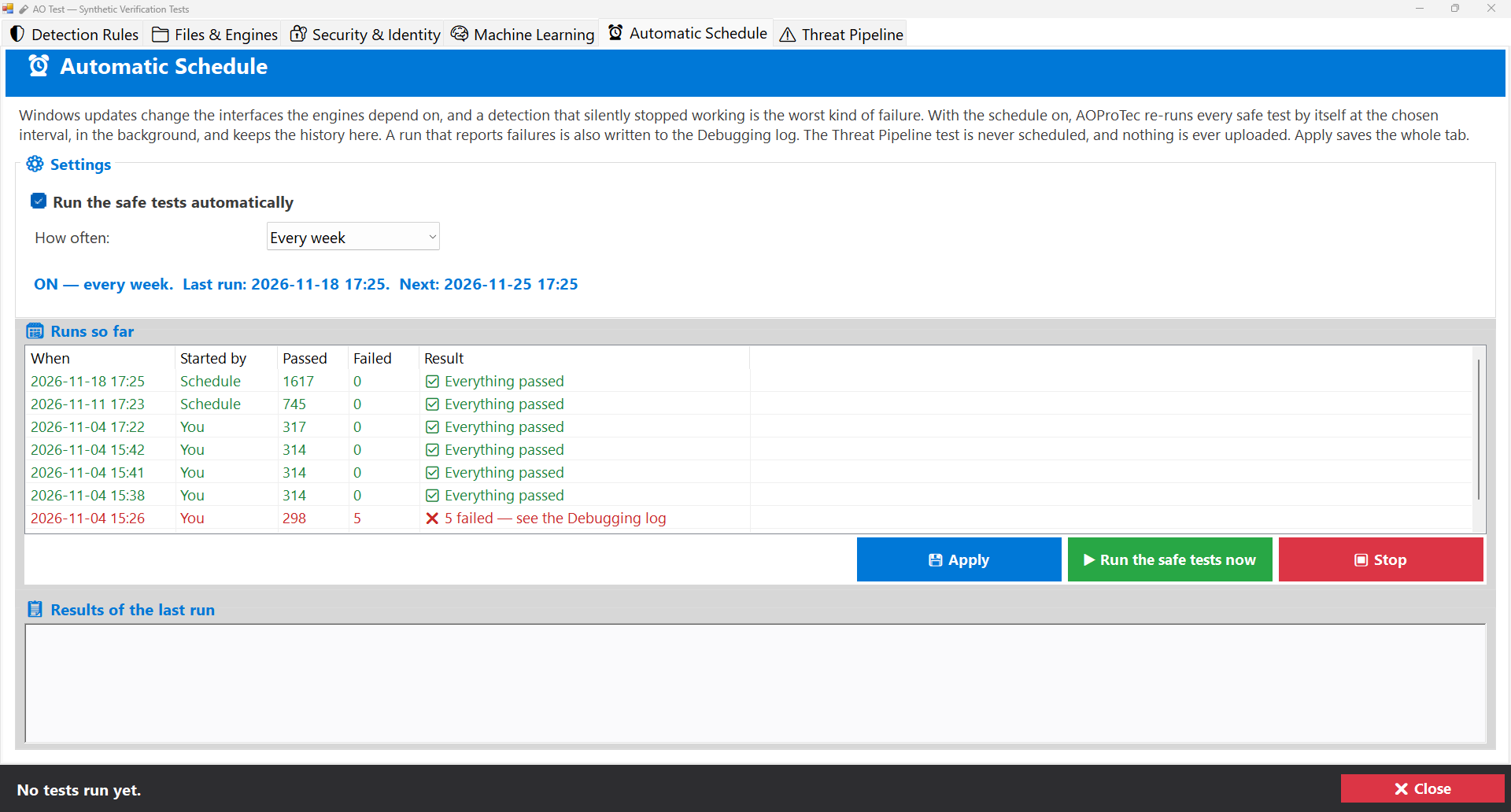
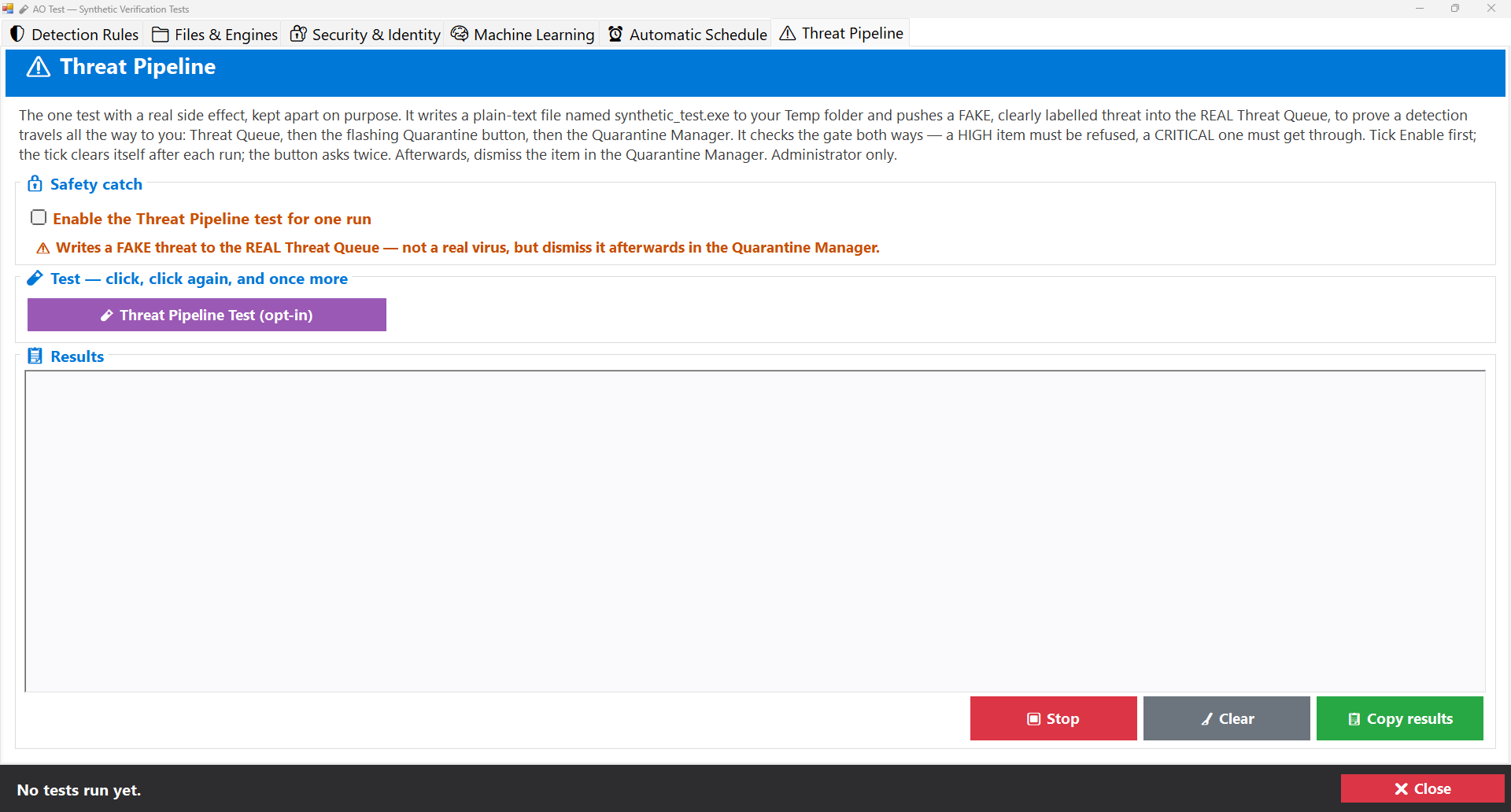
πŸ›‘ Detection Rules β€” the pattern logic itself: the eleven named behaviour rules, browser-started shells, payloads run out of Temp by Java or Windows Script Host, ransomware guards (decoys, raw-disk writes, backup and shadow-copy destruction, even inside an encoded PowerShell command), scam text, email rules and look-alike links, tracker blocking, installer identity. πŸ“ Files & Engines β€” file analysis, digital signatures, Office macros, the exploit log, webcam/microphone rules, Security Center, AOProTec's own-file guard, the privacy scrub, update rules. πŸ” Security & Identity β€” sign-in and two-factor against the published RFC test vectors, vault cryptography in memory, and the server's signatures: a real signed answer from antonopic.com must verify, and the same answer with one digit changed must be refused. 🧠 Machine Learning β€” the learning path on a THROWAWAY model, and a live count of what the real model learns from (see below). ⏰ Automatic Schedule β€” the safe tests re-run by themselves every day, three days, week or two weeks, with the history kept. ⚠ Threat Pipeline β€” the one opt-in test with a real side effect.

Files & Engines
Added 23 Nov 2026

AOTests Files & Engines

AOTests Files & Engines

Security Identity
Added 23 Nov 2026

AOTests Security Identity

AOTests Security Identity

Machine Learning
Added 23 Nov 2026

AOTests Machine Learning

AOTests Machine Learning

Automatic
Added 23 Nov 2026

AOTests Automatic

AOTests Automatic

Threat Pipeline
Added 23 Nov 2026

AOTests Threat Pipeline

AOTests Threat Pipeline

Help Documentation Debug
Added 23 Nov 2026

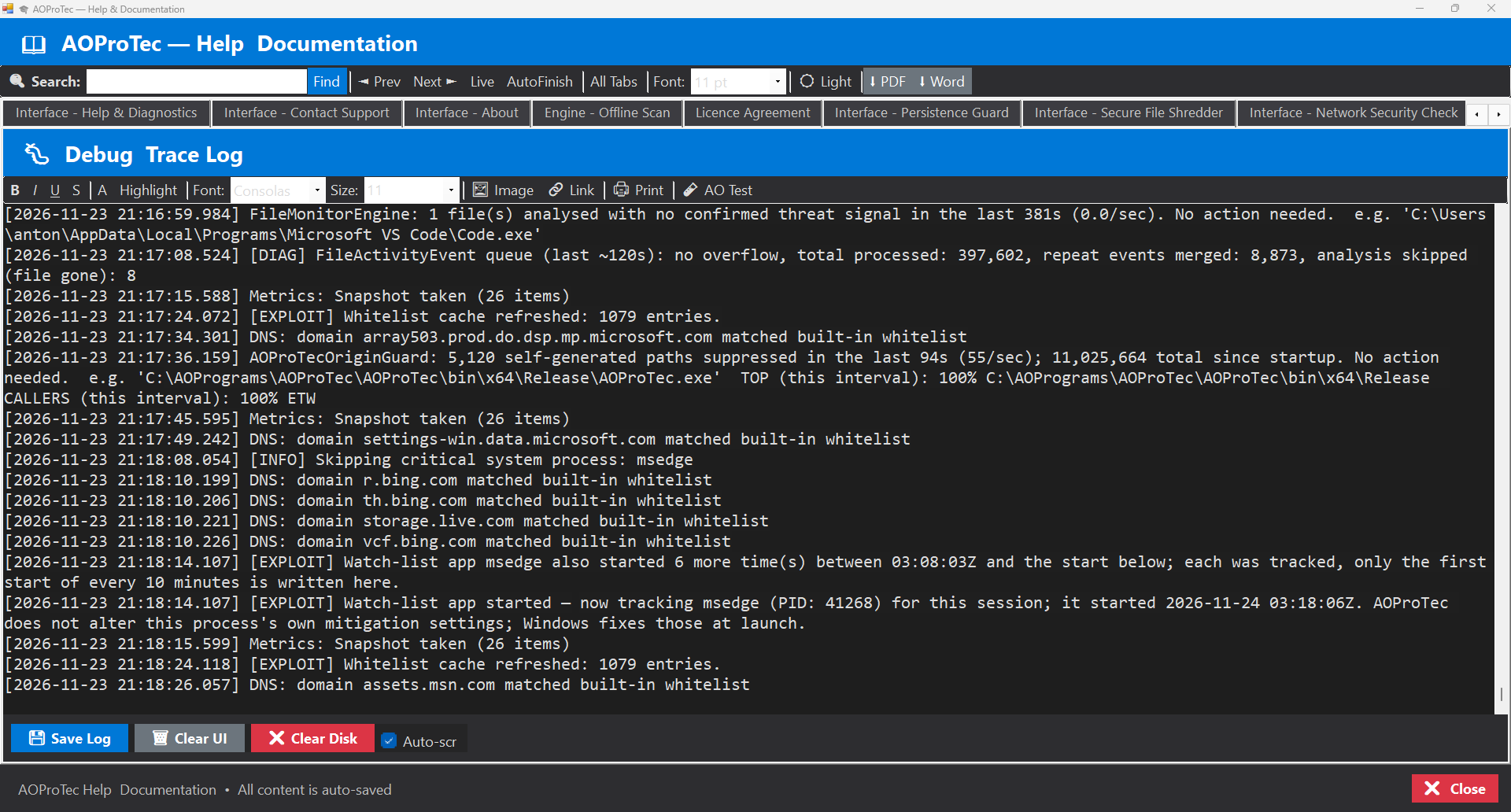
AOProTec Help Documentation Debug

Help & Diagnostics (this window) β€” Interface Guide
═══════════════════════════════════════════════════════════════

🎯 WHAT THIS WINDOW IS FOR
-------
The complete manual for AOProTec β€” what it does, how it works, and how to use it β€” plus the live diagnostic view of the running application. It is both the documentation and the instrument panel.

πŸ“š HOW THE TABS ARE ORGANISED
-------
Overview start here. Network Isolation & placed early on purpose: it is the tab you Recovery need in an emergency, and scrolling for it while a machine is compromised is no time to be searching. Interface - … one per window: what it is for, every control on it, and how to use them. Engine - … one per engine: what it does underneath. My Notes, Errors, Debug your notes and the live diagnostic tabs.

Each protection area generally has BOTH an Interface tab and an Engine tab β€” one for the window you look at, one for the machinery behind it.

πŸ“ MY NOTES TAB
-------
A free-text scratchpad that saves automatically and survives restarts. βž• Add Note has 🎀 Speak: Windows voice typing (Windows key + H) in the note box. Windows sends the voice to Microsoft's online speech service to make the text, so it needs internet and Online speech recognition turned on (Settings β–Έ Privacy & security β–Έ Speech). πŸ’Ύ Save writes your notes as a table (Done, Date, Note) in the format you pick β€” Text, PDF, HTML, Excel, Word, CSV, Rich Text, JSON, XML, LibreOffice and more. Errors and Debug save the same way (Time, Message).

❗ ERRORS TAB
-------
Genuine failures only. This tab staying empty is meaningful β€” it is the fastest way to tell whether AOProTec itself is healthy. Routine conditions are deliberately kept out of it so that anything appearing here is worth reading.

🐞 DEBUG TAB
-------
The live activity stream: what the engines are doing, moment to moment. Useful when you want to confirm something is actually happening rather than assume it.

It is a VIEW, not the record. Under heavy activity the display skips ahead to keep up and says so β€” nothing is lost from the log file on disk, only from what is drawn on screen. Detection never depends on this window being open.

While this window is hidden in the tray it takes no work at all. When you open it, it shows "⏳ Loading…" and then the newest 1,000 lines from the log files at once β€” no catching up β€” and carries on live from there.

The toolbar carries Print and πŸ§ͺ AO Test, which runs the synthetic verification suite β€” see the AO Test tab.

πŸ’Ύ WHERE THIS CONTENT LIVES
-------
Tabs are written to %APPDATA%\AOProTec\Help. Copying tabs.xml to another machine carries every tab with it, including any written by hand. The .rtf files beside it are regenerated on each launch, so they do not need copying.

Content maintained in code takes precedence over the stored copy, so updated documentation always reaches the screen rather than being blocked by an older saved version.

Help Documentation Max Parallel Scan Threads
Added 23 Nov 2026

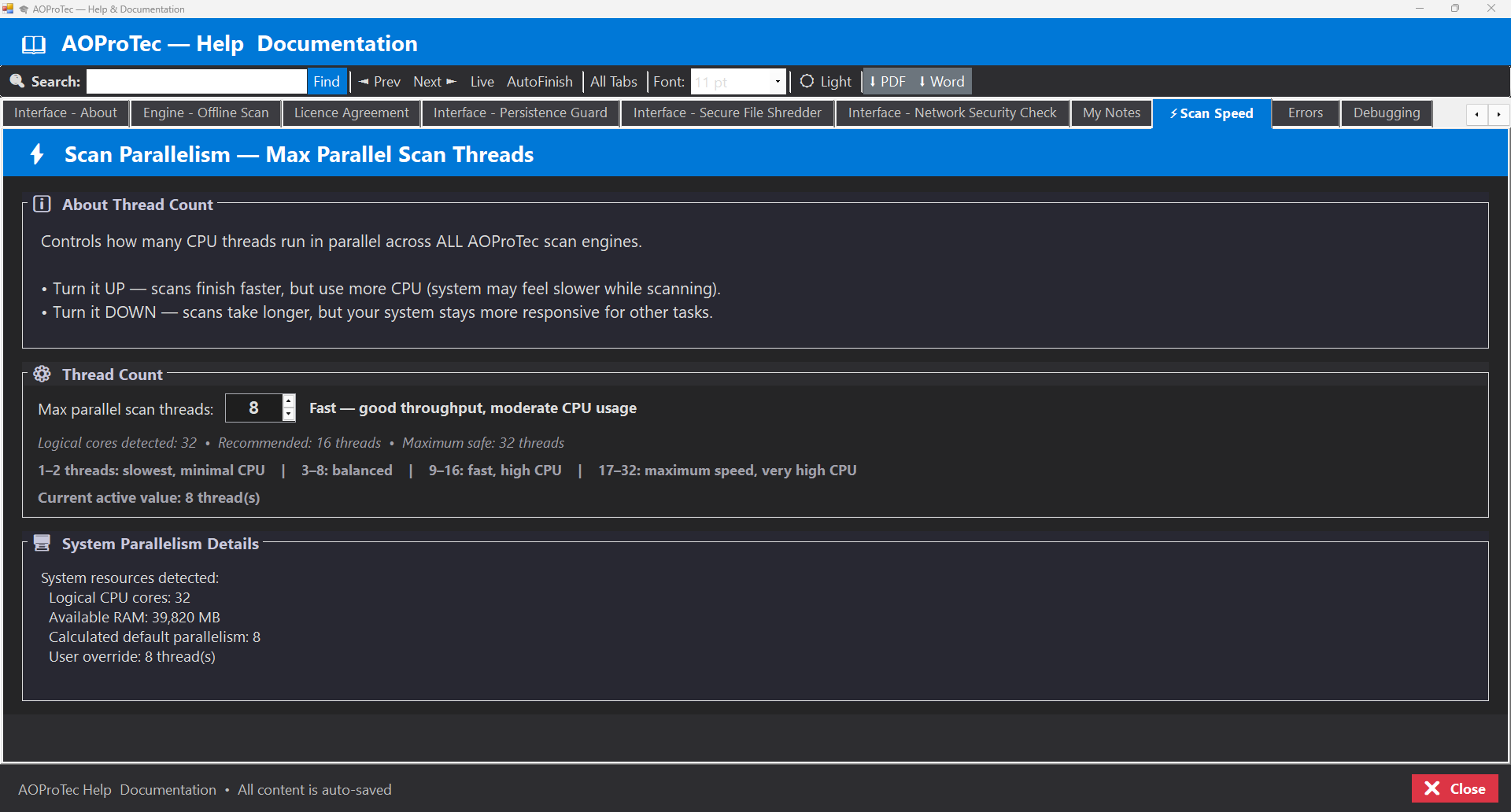
AOProTec Help Documentation Max Parallel Scan Threads

Help Documentation Max Parallel Scan Threads

Development updates

18 November 2026

Persistence Guard reads the registry behind Task Scheduler.

AOProTec 1.0.198 compares Windows' own record of scheduled tasks with the list Task Scheduler shows, and judges what PowerShell is told to run.

Read the whole updateClose this update

Persistence Guard is the window that shows what is set to run on a computer. Until now it read scheduled tasks from Task Scheduler's own list. Windows keeps its real record of tasks in the registry, and the two can differ.

On 18 November I compared them on my own PC. Task Scheduler listed 293 tasks. The registry held 3,659 entries. 3,325 of the extra ones sat at the top level under random names of five to eleven small letters, with no task and no task file behind them. They were last written between October 2025 and February 2026, 150 to 300 a day at the peak, which are the weeks in which the two unwanted programs I found on this PC arrived. They cannot run. Who made them is not proven. My test laptop had 33 such entries, all of them Windows' own.

AOProTec 1.0.198 makes that comparison at every sweep. Entries with no task behind them are counted by day on a new Leftovers tab. A whole task that Task Scheduler does not list because its permission record was removed, the way of hiding a task that Microsoft described in April 2022, goes to the Threat Queue as critical. On my laptop I made a task and removed its record: Windows' own schtasks command could no longer find it, and AOProTec reported it 3 seconds later.

The second change is about PowerShell. A startup entry that starts PowerShell used to read "signed: Microsoft Windows", because PowerShell is. Now the script it is told to run is what gets judged. My made-up entry was rated high 13 seconds after I made it, with the verdict "powershell.exe runs proof.ps1, user folder, no window, script policy set aside".

Also in this version: a Places tab that lists the 37 places a sweep examines and whether each could be read; Windows reports a new startup entry, scheduled task or service at once; the protection service sweeps while nobody is signed in; and a program replaced by a file with no valid signature is rated high.

Before it was signed, this build ran AOProTec's own tests inside the real program on my laptop: 1,700 passed, 0 failed.

18 November 2026

Windows asks about Location when you press the button.

AOProTec 1.0.197 asks Windows first whether its Location question would come up, so only Check Network Now and Scan Nearby can bring it up.

Read the whole updateClose this update

With Location switched off, Windows 11 keeps the details of Wi-Fi networks from programs. The first time a program asks for them, Windows shows its own question about turning Location on.

In AOProTec 1.0.197 the Network Security Check asks Windows beforehand whether that question would come up. Asking shows nothing. If the answer is yes, a check that runs by itself, at start-up, on its timetable or after the network changes, leaves the Wi-Fi details alone and says so in an amber row. Check Network Now and Scan Nearby, the buttons you press, ask Windows for them.

I switched Location off on my own PC to see it on a real machine. The amber row appeared, its button opened the Location page of Windows, and with Location back on the next check read everything and the row was gone.

The button bar that AOProTec's windows share now measures a button's words the moment they change, so a button whose words change shows them whole at a 150% screen scale.

Before it was signed, this build ran AOProTec's own tests inside the real program on my laptop: 1,662 passed, 0 failed.

18 November 2026

Your network is checked when it changes.

AOProTec 1.0.196 checks a network a few seconds after you join it, puts a serious network finding in the Threat Queue, and lets you mark what is your own choice.

Read the whole updateClose this update

AOProTec's Network Security Check tells you whether the network you are on is safe to be on: how it is secured, whether your router is the one it was last time, whether Windows Firewall is on, and which networks your PC joins by itself.

In AOProTec 1.0.196 the check runs by itself a few seconds after the network changes. Join another Wi-Fi network and AOProTec looks at it then, as well as when AOProTec starts and on its timetable.

Four serious findings get a row in the Threat Queue, so you see them with the window closed: your router's hardware address changed, Windows Firewall is off for the network you are on, the old file-sharing protocol SMBv1 is on, or a saved network with no security joins by itself. The fix is one button in the Network Security Check window. When a later check finds the thing fixed, AOProTec closes the row for you. Joining a network with no security shows a notice by the clock.

Some findings are your own doing, such as a DNS filtering service you set. Select the row and press This Is My Choice. AOProTec shows it as information from then on, for as long as it stays the same, so the verdict line can say that the network looks sound. If it changes, the row counts again. Take Back My Choice undoes it.

Wi-Fi is read from Windows' own Wi-Fi interface. The window shows the access point your PC is connected through, and Scan Nearby asks the Wi-Fi adapter for a fresh look at the air before it lists the networks in range. On my two test PCs a fresh look listed 14 and 17 networks.

AOProTec remembers your router together with the access points you reached it through. The same network name in another place, such as a provider's hotspots, is an amber row with one button to remember that router too. A different router behind an access point you already use is the red row.

The History tab has two buttons, Forget This Network and Clear the Check List, and keeps the newest 500 checks. The Settings tab gains three switches and the number of checks to keep.

Before it was signed, this build ran AOProTec's own tests inside the real program on my laptop: 1,655 passed, 0 failed. On that laptop the Wi-Fi connection was dropped and joined again: AOProTec noticed within seven seconds, checked the network by itself, gave a made-up open network that joins by itself its row in the Threat Queue, and closed that row by itself once the made-up network was removed.

18 November 2026

See how every program was checked.

AOProTec 1.0.194 rebuilds the Memory Scanner: a list of your running programs, a scan of one or of all of them, and a Coverage tab that shows how each program was handled.

Read the whole updateClose this update

Some attacks never put a file on your disk. They live in the memory of a program that is already running. AOProTec's Memory Scanner reads the memory of your running programs to find them, on the timetable you set and whenever you ask.

In AOProTec 1.0.194 its window is rebuilt. The Scan tab lists the programs running on your PC, with the memory each one uses, who signed its file and where the file is. Type a few letters to narrow the list. Scan one program, or press Scan All Programs to run the same scan the timetable runs, and press Stop Scan to end a scan you started.

The new Coverage tab shows how the newest scan of all programs handled each program. A program on AOProTec's trusted list, such as Windows' own programs and the well-known browsers, gets a lighter check when the real program is behind the name: its memory that can run and was not loaded from a file is read for known-malware signatures and for a hidden program. Every other program that can be read gets the full check. A program that was not read is listed with the reason, for example a game guarded by anti-cheat. You see which is which, program by program, with how much memory was read.

The Scan Report lists each scan of all programs that ran, whether it found anything or not, and keeps the newest 200. Choose a scan to read what it said.

The scanner itself looks in more places. Injected code has to sit in memory that can run and was not loaded from a program's file. AOProTec 1.0.194 reads that kind of memory at any size, down to a single 4 KB page, and reads it first in a program with thousands of memory blocks. It reports a whole program hidden in such memory. In a trusted program it reports a known-malware signature or a hidden program found there.

Nothing is ended or removed from the Memory Scanner window. A program with a Critical finding goes to the Threat Queue with its file, and you decide about it in Quarantine Manager.

Before it was signed, this build ran AOProTec's own tests inside the real program on my laptop: 1,617 passed, 0 failed. A made-up test program holding a harmless test pattern in a single 4 KB page of its own memory, and a copy of its own file header in memory not loaded from a file, was found by the scan on that laptop under a plain name and under a trusted name.

18 November 2026

A column you size keeps your width.

In AOProTec 1.0.193 a list column you drag or double-click keeps the width you gave it, the last column too, and a scroll bar takes you to the end of a long file path.

Read the whole updateClose this update

AOProTec shows what it finds in lists: the Threat Queue, the Quarantine Log, what a program did and where its file lives. The last column of such a list is often a file's full path, and a path can be longer than the window is wide.

In AOProTec 1.0.193 you size a column the way you do anywhere in Windows. Drag the edge of a column heading, or double-click the edge to fit the column to its longest row. The column keeps the width you gave it, the last column too, and when the columns are wider than the list a scroll bar along the bottom takes you to the rest. Columns you have not touched are sized by AOProTec as before, and your widths last until AOProTec restarts.

One shared routine now does this in place of the copy each window carried. AOProTec's own tests check it on each run, on lists made up for the test: a double-click on a column's edge, a drag, the window sized afterwards and the list filled again.

On Machine Learning, the Save Settings and Reset to Defaults buttons are as wide as their captions need at your screen's text scale.

Before it was signed, this build ran AOProTec's own tests inside the real program on my laptop: 1,591 passed, 0 failed.

18 November 2026

Machine Learning: one dataset, one Train button, an honest test.

In AOProTec 1.0.192 the Machine Learning window has five tabs and one saved dataset, and a new model is tested on examples it was not shown before it may be used.

Read the whole updateClose this update

AOProTec has a model of its own that learns, on your computer, what threats and good programs look like. In AOProTec 1.0.192 its window, Machine Learning, has five tabs and one saved dataset.

Training Dataset shows every example the model learns from, one row each: files you quarantined, dismissed or added, good programs from your trusted list, files AOProTec's own investigation cleared, and examples shared by the AOProTec network. Only numbers that describe a file are kept, never its name or its path. You can add files or whole folders, remove an example that is wrong, and import or export the set.

Model Training has one button. It sets one in five examples aside, trains a trial model on the rest and asks it about the ones it was not shown, so the result on screen is an honest test. Then the model must get ten fixed safety cases right, every one, before it replaces the model in use; when it does not, the window names the cases it got wrong. AOProTec runs the same steps by itself when enough new examples have come in.

A threat example comes only from a person: your own Quarantine, or a file you add as a threat. Good programs are learned automatically from your trusted list, and the learner remembers from one start to the next which of them it has read. The two training settings, threads and iterations, are used by every training, and every setting is on the last tab with one Save.

Before it was signed, this build ran AOProTec's own tests inside the real program on my laptop: 1,584 passed, 0 failed.

17 November 2026

Every risky startup entry reaches the Threat Queue.

In AOProTec 1.0.191 every entry Persistence Guard rates HIGH goes to the Threat Queue once, and an entry taken out there is kept, so it can be put back.

Read the whole updateClose this update

Malware has to survive a restart, so it leaves something behind that starts it again: a scheduled task, a startup value, a service. Persistence Guard rates every one of those entries on the PC, and since AOProTec 1.0.191 each one it rates HIGH goes to the Threat Queue once: a task that runs a program gone from a folder any program can write to, or an unsigned program there that is set to start by itself. It goes whether it appeared today or was already there when the computer was last recorded as normal, and whether its program is still on disk or not.

In the Threat Queue, Quarantine moves the program to the vault and takes a scheduled task or a startup value out. AOProTec keeps a whole copy first, the task's own definition and the account it runs as, or the value exactly as it was stored, and Put Back on Persistence Guard's History tab makes the entry again from that copy. AOProTec never takes an entry out by itself, and Dismiss tells it the entry is yours.

Store apps such as Teams start through a small link Windows keeps for them, an app alias. AOProTec follows that link to the program it opens, so Teams counts as what it is: Microsoft's own signed program. On my laptop the Threat Queue followed Teams' alias to Microsoft's signed Teams and cleared it by itself in seconds, without an alert.

The Threat Queue's examination also runs every step it can: when a file's bytes cannot be read, its signature, its structure and live forensics are still checked, and the steps that were skipped say so.

AOProTec's own tests ran inside the signed program on my laptop: 1,575 passed, 0 failed.

17 November 2026

Signed and clean: a program's own updater is approved in seconds.

Application Control reports every program that is not on a PC's approved list, and the Threat Queue examines it before any alarm. In AOProTec 1.0.189 that examination approves a signed program that checks out by itself.

Read the whole updateClose this update

Application Control keeps the list of programs approved on a PC and reports any program running that is not on it. Most new programs are approved within a second or two by AOProTec's process check. One that is still unlisted a minute later goes to the Threat Queue, which examines its file before any alarm.

Being off the list is a question about what a file is, not about anything it did. So in AOProTec 1.0.189 the examination answers it: a program whose signature Windows accepts, with a clean structure, clean live forensics and no source against it, and not a changed copy of its maker's file, is cleared and added to the approved list without a sound or an email. A program's own updater, which many programs run from the user's folder, is the usual case. Windows takes a similar line: Microsoft's Smart App Control lets a validly signed app run when its cloud cannot decide about it.

A signature says who made a file and that nobody changed it since. It does not prove the file is safe: certificates have been stolen and used to sign malware. So AOProTec takes a signature, a clean structure and clean forensics together only as the answer to what a file is. What a program does, such as encrypting files, injecting code or reading keystrokes, stays for the person to decide.

On my laptop I started a program signed by LunarG, the maker of the Vulkan tools, from a user folder. A minute later Application Control handed it to the Threat Queue, and the examination cleared it and approved it in under five seconds, without a sound.

On my laptop, AOProTec's own tests ran inside the real program: 1,535 passed, 0 failed.

17 November 2026

A signature says who made a file. AOProTec reads it to the letter.

In AOProTec 1.0.190 a trusted maker is known by the whole name in its signing certificate, and no signature, however well known the maker, clears what a program did.

Read the whole updateClose this update

A digital signature tells two things: who made a file, and that nobody changed it since. It does not tell whether the file is safe. Certificates have been stolen and used to sign malware, and code injected into a program runs under that program's signature.

So in AOProTec 1.0.190 a signature answers only questions about what a file is. A finding about what a program did, such as code found inside it, a change to AOProTec's own settings, encrypted files or recorded keystrokes, waits for the person to decide, whoever signed the program.

AOProTec keeps one list of the makers it trusts, and it knows each one by the full name in the signing certificate, letter for letter. I read the names from the signed programs on my two PCs: 65 different signers, from Microsoft and NVIDIA to the studios behind my games.

A file whose signature Windows refuses never passes as signed, whatever name its certificate carries. And a remote-control program, signed or not, is never approved by itself: scammers and intruders install them to work a PC from far away. The same goes for a command shell copied outside Windows' own folders.

On my laptop a program signed by LunarG, started from a user folder, was still examined and approved in under five seconds, without a sound. AOProTec's own tests ran inside the real program: 1,551 passed, 0 failed.

17 November 2026

Signed and clean: a program's own updater is approved in seconds.

Application Control reports every program that is not on a PC's approved list, and the Threat Queue examines it before any alarm. In AOProTec 1.0.189 that examination approves a signed program that checks out by itself.

Read the whole updateClose this update

Application Control keeps the list of programs approved on a PC and reports any program running that is not on it. Most new programs are approved within a second or two by AOProTec's process check. One that is still unlisted a minute later goes to the Threat Queue, which examines its file before any alarm.

Being off the list is a question about what a file is, not about anything it did. So in AOProTec 1.0.189 the examination answers it: a program whose signature Windows accepts, with a clean structure, clean live forensics and no source against it, and not a changed copy of its maker's file, is cleared and added to the approved list without a sound or an email. A program's own updater, which many programs run from the user's folder, is the usual case. Windows takes a similar line: Microsoft's Smart App Control lets a validly signed app run when its cloud cannot decide about it.

A signature says who made a file and that nobody changed it since. It does not prove the file is safe: certificates have been stolen and used to sign malware. So AOProTec takes a signature, a clean structure and clean forensics together only as the answer to what a file is. What a program does, such as encrypting files, injecting code or reading keystrokes, stays for the person to decide.

On my laptop I started a program signed by LunarG, the maker of the Vulkan tools, from a user folder. A minute later Application Control handed it to the Threat Queue, and the examination cleared it and approved it in under five seconds, without a sound.

On my laptop, AOProTec's own tests ran inside the real program: 1,535 passed, 0 failed.

Written as the work happens. Nothing here is written in advance. πŸ“¬ Get the news by email β€” a few times a year.

Page 2 of 5 Β· 46 updates