Anton Opic

City Racing

City Racing
Games

City Racing

RELEASED

Racing game published on Steam. Built in Unity with HDRP.

★★★★★ 5.0 (1 review)
$24.99one-time
Buy on Steam 🔔 Notify me

Available there now. Coming to antonopic.com soon — click 🔔 Notify me to get an email the day it is.

Pictures and videos

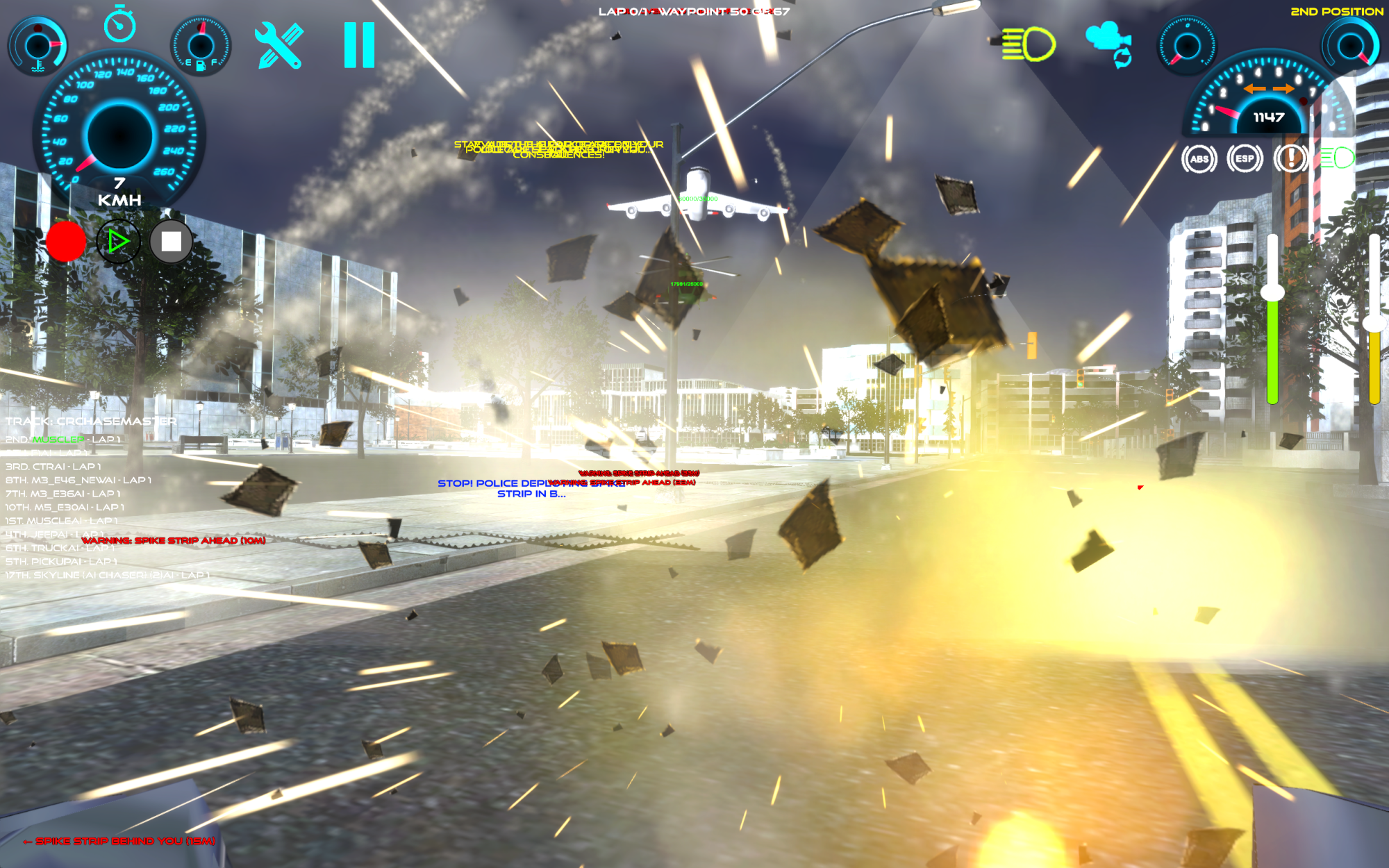
Helicopter Bombing The Player
Added 23 Nov 2026

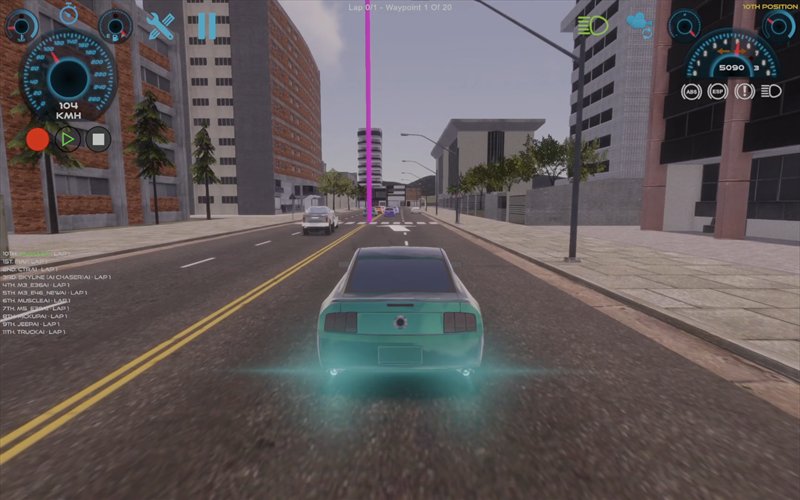
City-Racing Chase Scene

Helicopter Bombing The Player

Development updates

10 January 2026 START HERE

Epeson's City-Racing Review

Epeson has 36 reviews and Played City-Racing for 0.6 Hours, Posted: January 10-2026

Read the whole updateClose this update

City-Racing is a fast paced arcade street racer set in lively city environments, featuring nitro boosts and exciting police and helicopter chases. The driving feels responsive and easy to get into, making the races fun and energetic. What really stands out is the developer’s commitment, the game is being updated multiple times every week, with frequent fixes and improvements. While there’s still room for more content and variety, the core gameplay is solid and keeps getting better.
If you enjoy arcade racing with constant updates and active development, City-Racing is definitely worth checking out.
Big respect for the father-son team from Germany!

28 October 2026

About City-Racing

City-Racing is an exhilarating high-speed racing experience set in vibrant urban environments

Read the whole updateClose this update

About This Game
City-Racing is an exhilarating high-speed racing experience set in vibrant urban environments. Developed by a passionate father-son team, this Early Access title delivers the thrill of competitive street racing combined with intense police chases.

Key Features

• Dynamic Racing Action: Compete against 10 skilled AI drivers across multiple challenging courses

• Stunning Visuals: Experience realistic urban environments powered by Unity's High Definition Render Pipeline

• Intuitive Controls: Master your vehicle with responsive driving mechanics suitable for both casual and experienced racing enthusiasts

• Strategic Nitro System: Use your boost wisely to gain the competitive edge in crucial race moments

• Waypoint Navigation: Follow the dynamic arrow system to guide you through complex urban tracks

• Multiple Game Modes:

• Traditional racing circuits

• Scene selection for your favorite tracks

• Epic police and helicopter chases that test your ultimate driving skills

Technical Details

• Graphics Engine: Built using Unity's HDRP for photorealistic visuals

• Physics System: Realistic car handling and collision dynamics

• Day/Night Cycle: Experience races in different lighting conditions

• Controller Support: Full gamepad compatibility with customizable controls

• Customizable Options: Adjust graphics, audio, and gameplay settings to your preference

Early Access Journey

City-Racing is being actively developed by Anton and Tony Opic, a father and son with a shared dream of creating amazing multiplayer HDRP racing games. During Early Access, we're dedicated to implementing player feedback to deliver the best racing experience possible.

Join us on this exciting journey as we continue to add new features, vehicles, and race environments. Your support fuels our passion to create the ultimate urban racing game.

May the speed be with you!

Mature Content Description
The developers describe the content like this:

City-Racing is not only a racing game it also includes multiple weapons and shooting at Helicopters, Bomber Plane, police and shooting at random cars. You can get out of your car and shoot at objects. Including homing missiles, rockets, machinegun and more.

System Requirements
MINIMUM:
OS: Windows 10
PROCESSOR: Intel Core I7-9750H 2.60GHz 6 Cores
MEMORY: 16 GB RAM
GRAPHICS: NVIDIA GeForce RTX 2060
DIRECTX: Version 11
STORAGE: 25 GB available space
ADDITIONAL NOTES: Requires a 64-bit processor and operating system
RECOMMENDED:
OS: Windows 11
PROCESSOR: Intel Core Ultra 9 275HX processor
MEMORY: 32 GB RAM
GRAPHICS: NVIDIA® GeForce RTX™ 4090 Laptop GPU
DIRECTX: Version 12
STORAGE: 25 GB available space
ADDITIONAL NOTES: Requires a 64-bit processor and operating system
28 October 2026

City-Racing

Race through vibrant urban environments against elite drivers in this high-octane street racing game

Read the whole updateClose this update

Race through vibrant urban environments against elite drivers in this high-octane street racing game. Navigate waypoint courses, use nitro boosts strategically, and compete across multiple tracks. Master your driving skills to overcome the ultimate challenge: an intense police helicopter chase.

23 July 2026

Cars that crashed off the edge of the map at high speed would fall forever they now automatically reset back to the last checkpoint you passed

Cars that crashed off the edge of the map at high speed would fall forever — they now automatically reset back to the last checkpoint you passed.

Read the whole updateClose this update

REGULAR UPDATE
POSTED
Thu, July 23
Cars that crashed off the edge of the map at high speed would fall forever
they now automatically reset back to the last checkpoint you passed. Fixed a bug where a crashed car resting
Fixed:
Cars that crashed off the edge of the map at high speed would fall forever — they now automatically reset back to the last checkpoint you passed.
Fixed a bug where a crashed car resting on its side or upside-down could get stuck with the camera flickering/glitching instead of recovering. Flipped cars now reliably right themselves and return to the track within a few seconds.
Fixed a potential build-stability issue in the city traffic system that could have caused compile failures in future builds.
Technical changelog (for you)
Player recovery system (CRCarInfo.cs)
New: player car falling below the map (Y < -5) now auto-resets to the last waypoint it passed, facing the right direction, with velocity cleared so it doesn't land still spinning.
New: player car flipped/on its side for ~2.5+ seconds now gets the same waypoint-reset treatment, replacing reliance on the vehicle asset's unreliable built-in recovery.
This only affects the player's car — AI and traffic cars are untouched and keep their existing separate recovery logic.
Realistic Car Controller (vendor asset) fix (RCC_CarControllerV4.cs)
Fixed its built-in "auto-right the car" feature, which only detected sideways rolls (not nose-over-tail flips) and never cleared the car's spin/velocity before repositioning — that was the source of the flicker/repeat-fail loop.
Disabled its global auto-reset entirely at runtime now that your own player recovery handles it more reliably; AI cars still recover fine through their existing stuck-detection.
Backed up the original file (RCC_CarControllerV4.cs.bak) before editing, since this project has no version control yet.
Fantastic City Generator (vendor asset) fix
Found and fixed two scripts (TrafficSystem.cs, FCGWaypointsContainer.cs) that referenced an Editor-only Unity namespace without a proper build guard — this is the kind of bug that compiles fine in the Unity Editor but can fail a real Standalone/Player build. Worth doing a fresh test build to confirm before your next Steam push.
Also reviewed this session (no changes made, just findings for later):
Full pass over your own Assets/Scripts — flagged some duplicated/dead code worth cleaning up eventually (three overlapping airplane-attack implementations, duplicate waypoint scripts, etc.) but nothing urgent.
Developer Anton Opic 2026 Clause Sonnet 5

13 May 2026

Now we also needed to tighten the IsCarAhead

we rewrite ScanForTrafficCars to (1) only consider cars in our actual lane

Read the whole updateClose this update

Looking at the current implementation, awareness has two problems that cause clumping:
1.The "in-path" test is too wide — a 35° forward cone within 35 m means any traffic car roughly in front (even one or two lanes over) triggers a slow-down. So, when a pack of city cars is around, the AI brakes for cars it could just drive past.
2.The cap fires even when there's a clearly open overtake lane — so the AI matches the slow car's speed (~36 km/h) instead of swinging into the free lane and blasting past.
Fix: tighten the geometry to "in my lane" only, and don't apply the speed cap if an adjacent lane is open (let the lane-selection logic do the dodging instead). I'll also raise the default headroom, so the AI keeps enough momentum to actually pass.
Now we rewrite ScanForTrafficCars to (1) only consider cars in our actual lane (lateral check), and (2) skip the speed cap if there's a free adjacent lane. Also we tighten IsCarAhead's TrafficCar add-on so it doesn't over-trigger every frame.
Now we also needed to tighten the IsCarAhead traffic-car add-on so it only triggers when the car is genuinely close-in-lane (not a 60° cone for any TrafficCar within 0.6 * laneWidth of the lane center which over-fires):

What was wrong
1.The old "in path" test was a 35° forward cone within 35 m, so the AI saw traffic cars one or two lanes over and treated them as obstacles → constant brake.
2.Even when a clear overtake lane existed, the speed cap still fired (otherSpeedKmh + 6 km/h), so the AI matched the slow city car's speed (~36 km/h) instead of swinging around → the clumping you described.
3.IsCarAhead's TrafficCar add-on also used a 60° cone, so every lane-selection tick the AI thought it had a car ahead.
Fix (in CRAILearningSystem.cs)
ScanForTrafficCars was rewritten with two key rules:
·Lane-tight geometry: a traffic car only counts as "in my lane" if its lateral offset (using Vector3.Dot(myRight, toOther)) is within ±laneWidth/2 AND forward distance is within trafficFollowDistance (now 9 m, was 18 m). Anything else is in an adjacent lane.
·Free-lane bypass: while scanning, the AI also classifies every nearby traffic car into left-adjacent / right-adjacent buckets. If either adjacent lane is clear within trafficFollowDistance + overtakeFreeLaneMargin, the speed cap is skipped entirely — AdvancedLaneSelection is allowed to swing around at full pace. The cap only kicks in when the AI is actually boxed in.
Tuning defaults raised so even a worst-case follow keeps overtake momentum:
·trafficFollowHeadroom: 6 → 20 km/h (closes faster, retains energy for the next opening)
·trafficHazardSpeedCap: 12 → 25 km/h (no more crawling behind a stopped car when traffic clears)
·trafficFollowDistance: 18 → 9 m (commit to the overtake instead of pre-braking)
·New overtakeFreeLaneMargin (6 m) controls how far ahead an adjacent lane must be clear to count as a free overtake.
·Removed the now-redundant trafficForwardConeAngle — the lateral lane check is more accurate.
IsCarAhead also tightened: TrafficCar detection now requires forward + lateral checks against the lane's axes, not a wide cone, so lane selection only flips to overtake mode when there really is a car in that lane within follow distance.
Result
·✅ AI keeps full speed when traffic is in other lanes
·✅ AI lane-changes around slow city cars (and other AI cars, via the existing logic) instead of slowing down
·✅ AI only brakes when boxed in with no overtake lane available — and even then keeps +20 km/h headroom so it can pounce as soon as a gap opens
·✅ Same toggle: leave enableTrafficCarAwareness checked for the dodging behavior we originally wanted; uncheck it to fall back to pure waypoint-following
If we still see brake-happy behavior after testing in-game, the two knobs to tweak first in the inspector are trafficFollowDistance (lower = brake even later) and overtakeFreeLaneMargin (higher = AI declares lanes "free" more aggressively).
Developed By: Anton Opic & Copilot – Claude Opus 4.7 Copyright 2026,5,13

13 May 2026

The AI drove better when I stopped helping it

The traffic cars had awareness of each other. Turning it off made them better drivers.

Read the whole updateClose this update

I had built the AI cars to be aware of the traffic around them. More information, better decisions — obviously.

Turning that awareness off made them drive noticeably better.

What was actually happening was cars reacting to each other reacting to each other, each one braking for a car that was only braking because of them. Feedback, not intelligence. Removing the input removed the loop.

That one has stayed with me and it turns up everywhere, including in AOProTec: more signal is not automatically better judgement. Sometimes the thing you added is the thing causing the behaviour you are trying to fix.

4 May 2026

added a real lane‑offset field and use it when building the per‑car waypoints

added a real lane‑offset field and use it when building the per‑car waypoints TrafficCar interaction, Correct Lane Driving on the Right

Read the whole updateClose this update

Let me explain the issue clearly:
Why the cars still drive in the center: The field perfectCenteringDistance is not a lane offset — it's just the tolerance the learning system uses to score whether a pass through a waypoint counts as "perfect" (within X meters of the waypoint). Setting it to 5 just makes the scorer more forgiving; it doesn't move the car off the road centerline.
The AI follows whatever positions are stored in the per-car waypoints container, and CreatePerCarWaypointsContainer() clones waypoints with src.transform.position — i.e., dead center of the road. To put cars in the right lane I need to add a real lane offset that shifts each cloned waypoint perpendicular to the road direction.
TrafficCar interaction: The methods tc.GetSpeed() / tc.IsHazard() exist and the scan logic is fine. The reason it can look "broken" today is that AI cars are driving on the centerline, so they sit on top of TrafficCars (overlapping/clipping) instead of approaching them in a forward cone — ScanForTrafficCars requires the traffic car to be ahead within a forward cone, so head‑on/centerline overlap makes the awareness misfire. Fixing the lane offset fixes the awareness too.
I added a real lane‑offset field and use it when building the per‑car waypoints, and add a clarifying tooltip on perfectCenteringDistance so it isn't confused for a steering offset.
No errors. Here's a summary of the fix:
What was wrong
·perfectCenteringDistance is a scoring tolerance for the learning system (how many meters from the waypoint counts as a "perfect" pass). It never fed into steering, so changing it from 3 → 5 didn't move the car off the centerline.
·CreatePerCarWaypointsContainer() cloned each waypoint at src.transform.position — i.e., the road centerline — so the AI dutifully chased the centerline.
·The TrafficCar awareness (ScanForTrafficCars → tc.GetSpeed()/tc.IsHazard()) is wired up correctly. Its forward‑cone test was just being undermined by the AI sitting on top of TrafficCars on the centerline (overlap, not "ahead in cone"), so it rarely engaged.
What I changed in CRAILearningSystem.cs
Added a clear tooltip on perfectCenteringDistance so it's no longer mistaken for a lane offset.
Added a real lane positioning section:
· DrivingSide drivingSide (Right / Left)
· laneOffsetFromCenter (default 5, range 0–10)
Rewrote the per‑car waypoint clone to:
· Compute the road forward direction from the previous/next waypoint (the original RCC waypoints aren't rotated to follow the road, so transform.right was unreliable).
· Compute world‑space right via Vector3.Cross(Vector3.up, forwardDir).
· Place each cloned waypoint at centerline + right * (laneOffsetFromCenter * ±1) depending on drivingSide.
· Save the cloned waypoint with a real LookRotation(forwardDir) so anything that reads its forward gets a sensible value.
On each AI car's CRAILearningSystem component:
·Set Driving Side = Right.
·Set Lane Offset From Center = 5 (or ~1.75 if you want the inner right lane on a standard 3.5 m × 4‑lane road; 5 will put it well into the outer right lane).
·Leave Perfect Centering Distance as a tolerance value (~3 is fine).
Because the per‑car waypoints are now offset into the right lane, the TrafficCar scanner will start seeing same‑lane traffic in its forward cone and the slow‑down / hazard logic will engage as designed.
Created By Anton Opic, Copilot, Claude Opus 7x Copywright 2026

23 April 2026

New Waypoint FIX BIG Change!!!!

All AI cars (truck, F1, etc.) were sharing the same single waypoints container in the hierarchy

Read the whole updateClose this update

The Problem We Solved
All AI cars (truck, F1, etc.) were sharing the same single waypoints container in the hierarchy. The learning system was writing learned targetSpeed values back into those shared waypoints — so:
·The F1 would lower a corner speed to 60 km/h because the truck couldn't make it.
·Then the F1 would push it back to 120 km/h and the truck would fly off.
·They were constantly overwriting each other's learning on the same data.
·The "main" designer-tuned waypoints got polluted permanently.
A truck and an F1 physically cannot take the same corner at the same speed — so they shouldn't be sharing the same learned numbers.
What We Did (in CRAILearningSystem.cs)
1. Introduced a per-car runtime waypoint container
Added two new inspector fields:
·usePerCarWaypoints (bool, default true)
·blendWithMainGuide (0–1 slider, default 0.15)
And two private references:
·mainWaypointsContainer — the original shared container, now treated as a read-only guide.
·perCarWaypointsContainer — a runtime clone that only this AI car uses.
2. New method CreatePerCarWaypointsContainer()
On Start(), before any learning kicks in, each AI car:
·Looks up the shared container assigned on its RCC_AICarController.
·Creates a brand-new GameObject named exactly Waypoints, {SceneName}, {CarName} (e.g. Waypoints, CityRacing1, F1).
·Adds an RCC_AIWaypointsContainer to it.
·Clones every waypoint (position, rotation, targetSpeed, radius) as a child RCC_Waypoint.
·Re-points aiController.waypointsContainer to this new per-car container.
·If the same-named container already exists in the scene (respawn case), it reuses it instead of duplicating.
From this point on, every existing line that writes waypoints[i].targetSpeed = ... automatically writes to the per-car copy, never the shared one. No other code had to change.
3. Compromise with the main guide
At the end of AdjustWaypointSpeedAggressive, after clamping the new speed, we lerp it toward the main guide's targetSpeed:
newSpeed = Mathf.Lerp(newSpeed, guideSpeed, blendWithMainGuide);
This is the "compromise" you asked for — each car learns its own speeds but never drifts too far from the designer's base profile. Set blend lower for more freedom, higher to stay closer to the original.
4. Save/Load already keys per car + per scene
SaveLearningData() and LoadLearningData() were already keying by
SceneManager.GetActiveScene().name
+
aiController.CarController.name
, so no changes were needed there. Now they correctly resume each car's individual learning at race start, and save it at race end via OnRaceFinished().
5. Fixed the truncation bug
The big edit accidentally dropped the class's closing } and the three [Serializable] data classes (LearningData, VehicleLearningData, PassData) at the bottom — that caused the cascade of CS1513 and CS0246 errors. Restored them and the file now compiles clean.
Why It's Better Now
Before
After
One shared waypoints list for all AI cars
Each AI car has its own runtime copy: Waypoints, {Scene}, {Car}
Truck and F1 overwrote each other's learning
Truck learns truck speeds; F1 learns F1 speeds
Main waypoints got permanently mutated
Main waypoints stay pristine — used as the guide only
Hierarchy was confusing — couldn't tell what was learned
Hierarchy now shows one container per car per scene, easy to inspect
No safety net for runaway learning
blendWithMainGuide keeps each car honest against the base profile
Save/load mixed everyone's data into one file structure
Same save file, but each car's data is correctly isolated and re-applied to its own per-car container

What You'll See in the Hierarchy at Runtime
Waypoints ← your original shared "guide" (untouched)
Waypoints, CityRacing1, Truck ← truck's personal learning copy
Waypoints, CityRacing1, F1 ← F1's personal learning copy

23 April 2026

breakdown of the three big upgrades

Here's a breakdown of the three big upgrades and why each one makes the AI noticeably better.

Read the whole updateClose this update

🏎️ Recap: What We Just Did to CRAILearningSystem.cs
Here's a breakdown of the three big upgrades and why each one makes the AI noticeably better.
---
1. 🗑️ Killed the global minWaypointSpeed / maxWaypointSpeed Before: Every car on every track was hard-clamped between two magic numbers (e.g. 30–250 km/h) in the inspector. A Formula car and a city sedan got the same ceiling, and a tight roundabout had the same floor as a freeway.
After: Bounds are derived per-waypoint from baseSpeed (the designer-tuned value cloned into the per-car / dynamic container):
·Sharp corners: ceiling shrinks toward 0.85 × baseSpeed
·Straights: ceiling opens up to 1.4 × baseSpeed
·Floor: 0.4 × baseSpeed
Why it's better: The dynamic per-car waypoints are now the single source of truth for "how fast is reasonable here." No more babysitting two sliders per scene/car combo, and a hairpin literally can't be clamped at the same number as the back straight.
---
2. 🧠 Predictive Backward Braking — the actual cornering fix, This is the big one. The complaint was "cars at 100 mph just plow to the middle of the road and never make the turn." That happens because the AI was only braking at the corner, not before it.
New method: PropagateCornerBrakingBackward(currentWP) — runs every frame after ApplyLearnedSpeedsAhead().
It walks cornerLookAhead waypoints out (default 8) and, for every adjacent pair, enforces a physical braking budget: prevWP.targetSpeed ≤ aheadWP.targetSpeed + (distance × maxBrakingPerMeter) …and sharper corners shrink that per-meter budget, so steeper turns force earlier brake points. Crucially, the lower ceiling is written back into learningData[prevWP].optimalSpeed — so the car remembers the new brake point next lap instead of re-discovering it by overshooting again.
Why it's better:
·A 90° corner learned at 50 km/h now automatically drags the previous 1–8 waypoints down to a deceleration curve the car can physically achieve.
·High-speed cars finally make the turn instead of understeering across the centerline.
·It's a physics-aware look-ahead, not just "copy the speed onto the next 2 waypoints."
---
3. 💾 Save / Restore now includes Corner Detection + Learning History
Before: Only optimalSpeed was persisted. Corner classification, sharpness, best offset, navigation count, and good/bad streaks were all thrown away on scene reload — so the car effectively started from scratch every race.
After — PassData now persists:
·baseSpeed
·isCorner + cornerSharpness
·bestOffsetAchieved
·averageOffsetFromCenter
·timesNavigated
·consecutiveGoodPasses / consecutiveBadPasses
ApplyLoadedLearningData() restores all of it and immediately stamps the learned speeds onto the per-car waypoints, so the AI is racing at its learned pace from frame 1.
Why it's better:
·The corner "memory" survives scene reloads, restarts, and car swaps.
·Saved data is keyed by trackName + vehicleName, so each car has its own learning per track — exactly matching the per-car/dynamic waypoint container Waypoints, {Scene}, {Car}.
·Old save files still load (new fields just default to 0/false until the next save).
---
🚀 Net Result
Symptom before
Why it happened
What fixes it now
Car barrels into a corner at 100 mph and misses the apex
Brake point was AT the corner waypoint
Predictive backward braking pulls earlier waypoints down
AI re-learns the same corner every race
Streaks/corner data weren't saved
Full corner state is persisted in PassData
Had to babysit min/max speed sliders per scene
Hard global clamp
Bounds now derived from baseSpeed × corner-aware multiplier
Per-car container existed but didn't get the learned cornering on load
Restore only set optimalSpeed, no propagation
Restore now writes to both learningData and waypoints[i].targetSpeed
---
🔮 Where to go next (low-hanging fruit)
·Tune maxBrakingPerMeter per car class (a sports car can shed 2.0 km/h/m, a truck maybe 0.8).
·Save speedTrendUp/Down too, so the "confidence" momentum survives reloads.
·Visualize the brake propagation in OnDrawGizmos — draw a colored line from each waypoint's pre-propagation speed to its post-propagation speed, so you can see where the AI brakes.
·Auto-tune sharpCornerAngle per track based on average corner geometry instead of a fixed 35°. We are stoked — this is exactly the kind of foundation where each lap genuinely makes the AI faster. 🏁
Created/Developed By Anton Opic & Copilot Claude OPUS 4.7 7x 4/23/2026

21 April 2026

Advanced Lane and Traffic Rule Awareness

Integrated your city’s map/road data (tsActive, tsOneway, tsOnewayDoubleLine, etc.) into the AI system.

Read the whole updateClose this update

What We Did Today:
1. Advanced Lane and Traffic Rule Awareness
• Integrated your city’s map/road data (tsActive, tsOneway, tsOnewayDoubleLine, etc.) into the AI system.
• Wired up the AI to use this data for smarter, more realistic driving:
• No overtaking on double lines (AI respects no-passing zones).
• No wrong-way driving on one-way streets (AI follows correct traffic flow).
• Skips inactive/closed waypoints (AI avoids blocked or closed roads).
2. Robust Data Access
• Ensured the AI accesses the correct shared waypoint data (wpData) from the city’s TrafficSystem.
• Added a public getter to TrafficSystem so any AI can safely access the latest map/road data.
3. Persistent AI Learning
• Improved the AI’s ability to save and load learned driving data (like optimal speed per waypoint) for each vehicle and track.
• Now, when a race starts, the AI loads what it learned from previous races and applies it immediately—making it smarter over time.
4. Flexible, Modular AI
• Made the AI lane logic work for any number of lanes and any road layout.
• The system is now easy to extend for new rules, new maps, or new types of traffic behavior.

Why This Is Better Than Before
• Realism: AI now obeys real-world traffic rules, making races and city driving feel authentic.
• Safety: No more AI cars making illegal or dangerous maneuvers (like overtaking on double lines or driving the wrong way).
• Adaptability: The AI can handle any city layout, any number of lanes, and any road configuration.
• Continuous Improvement: AI gets better the more you play, learning from every race and applying that knowledge next time.
• Maintainability: The code is modular and easy to update for new features or rules.

What You Can Do Next
• Add More Traffic Rules:
Implement country-specific driving (left/right), traffic light logic, or speed limits per road segment.
• Smarter Overtaking:
Add logic for AI to consider traffic density, player position, or even weather conditions.
• Dynamic Events:
Use tsActive to dynamically close/open roads for events, accidents, or construction.
• Visual Debugging:
Add gizmos or UI to visualize which waypoints are active, one-way, or no-overtake zones.
• Performance Tuning:
Profile and optimize for large cities or many AI cars.

In summary:
Your City-Racing AI is now smarter, safer, more realistic, and always learning. You have a strong foundation for a living, dynamic city traffic system that can grow with your game!

Also What We Did tonight:
1. Traffic Density-Aware Overtaking
• We added logic so the AI will only attempt to overtake if the lane is not too crowded.
• This is done by counting the number of cars in the same lane ahead of the AI using a physics overlap check.
2. Inspector-Tunable Aggression
• We exposed the densityThreshold field in the Unity Inspector.
• This allows you to easily adjust how aggressive or cautious the AI is about overtaking:
• Lower value: AI avoids overtaking if there’s even one car ahead (very cautious).
• Higher value: AI will overtake even if there are several cars ahead (more aggressive).
3. Clean, Modular Implementation
• The overtaking logic is now modular and easy to maintain.
• No references to weather or other systems you don’t use, so the code is clean and error-free.
---
Why This Is Better
• Realistic Behavior: AI now makes overtaking decisions based on actual traffic conditions, not just simple rules.
• Easy Tuning: You can quickly adjust AI behavior for different cars, tracks, or difficulty levels without changing code.
• Extensible: You can add more factors (like player position, road type, or even weather in the future) to the overtaking decision easily.
What We Want To Do Next
• Tune densityThreshold in the Inspector for each AI car or prefab to create different personalities (e.g., aggressive racers vs. cautious commuters).
• Add more logic to GetTrafficDensityInLane (e.g., filter by car type, only count cars ahead, etc.).
• Combine with other rules (like no-overtake zones, one-way streets, or dynamic events) for even smarter AI.
We Will Try To build the best city racing experience possible! 🚗💨 Or My Name Is Not Anton Opic! And A Special Thanks To GitHub Copilot GTP 4.5. and Unity & Visual Studio, C#, 1:51:00 AM 4/21/2026

Written as the work happens. Nothing here is written in advance. 📬 Get the news by email — a few times a year.

Page 1 of 2 · 12 updates